
Emergency Fund Calculator
Your 3–6 month emergency fund target — and when you'll reach it.
Open calculator Live
Web app (installable PWA)
Live
Web app (installable PWA) Net Worth Tracker
A private net worth tracker for your phone and computer — add what you own and what you owe, check in once a month and watch your net worth climb, with milestones, a what-if forecast and a printable Net Worth Statement.
Try the live demo to explore the application — it runs right here on VaultlyApps with sample data, no sign-up needed.

Summit is a net worth tracker. You add your assets (cash, savings, investments, retirement, real estate, vehicles, crypto) and your debts (credit cards, student loans, auto loans, mortgage), then check in once a month. Each check-in is saved, so Summit shows your net worth history, the change over a month, a year and 12 months, milestones you've reached, your arrival date for a goal, a what-if investing forecast and ratios such as debt-to-asset and emergency runway. It is a tracking tool — it does not connect to any bank.
A net worth calculator gives you one number today and forgets it tomorrow, and a spreadsheet gets messier every month. What you really want to know is the trend — am I moving up, how fast, how much debt have I paid off, and when will I reach my goal? That needs a history, and a habit simple enough to keep. Summit makes the monthly check-in a two-minute job and turns the history into something you actually want to look at.
Cash and checking, savings, investments, retirement, real estate, vehicles, crypto, business and valuables, plus credit cards, student loans, auto loans, mortgage, personal and medical debt — each with a type, bank, liquid flag, owner and rate.
Every account on one screen with last month's balance already filled in. The new net worth adds up as you type, a journal line records what happened, and each month becomes a saved waypoint.
A mountain-range chart with one peak per check-in, an above-and-below sea level chart of assets and debts, a month-by-month table with change in dollars and percent, your best month and year over year.
Built-in camps — net worth above $0, debt-free (all but the mortgage), $10k, $25k, $50k, $100k, $250k, $500k and $1M — plus your own, with the month you first reached each one.
Set a net worth goal and a date. Summit shows how far up you are, when you'll get there at your current pace and how much you'd need each month to arrive on time.
Try a monthly investing amount, an expected growth rate and extra debt payments, and see your net worth in 10, 20 or 30 years, your goal date, your $1M date and your debt-free date next to your current trend.
Asset allocation, liquid vs locked-up money, debt-to-asset ratio, liquid net worth, emergency runway in months and home equity for each home with a linked mortgage.
Add a partner and give each account an owner — you, your partner or joint — then switch between the household view and each person's own net worth.
Scroll sideways · select to enlarge
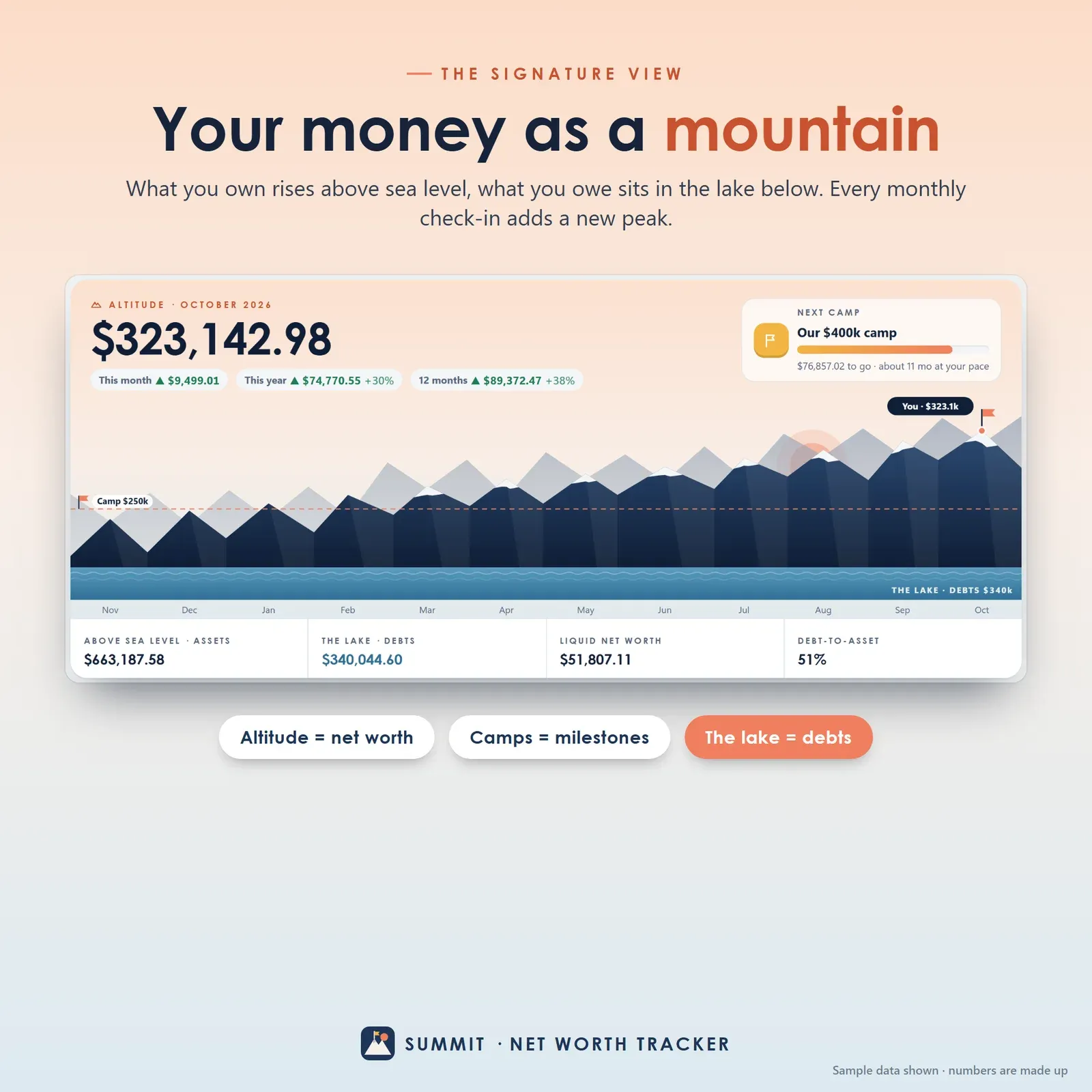
Net worth shown as a mountain range — assets above sea level, debts in the lake below, milestones as flags
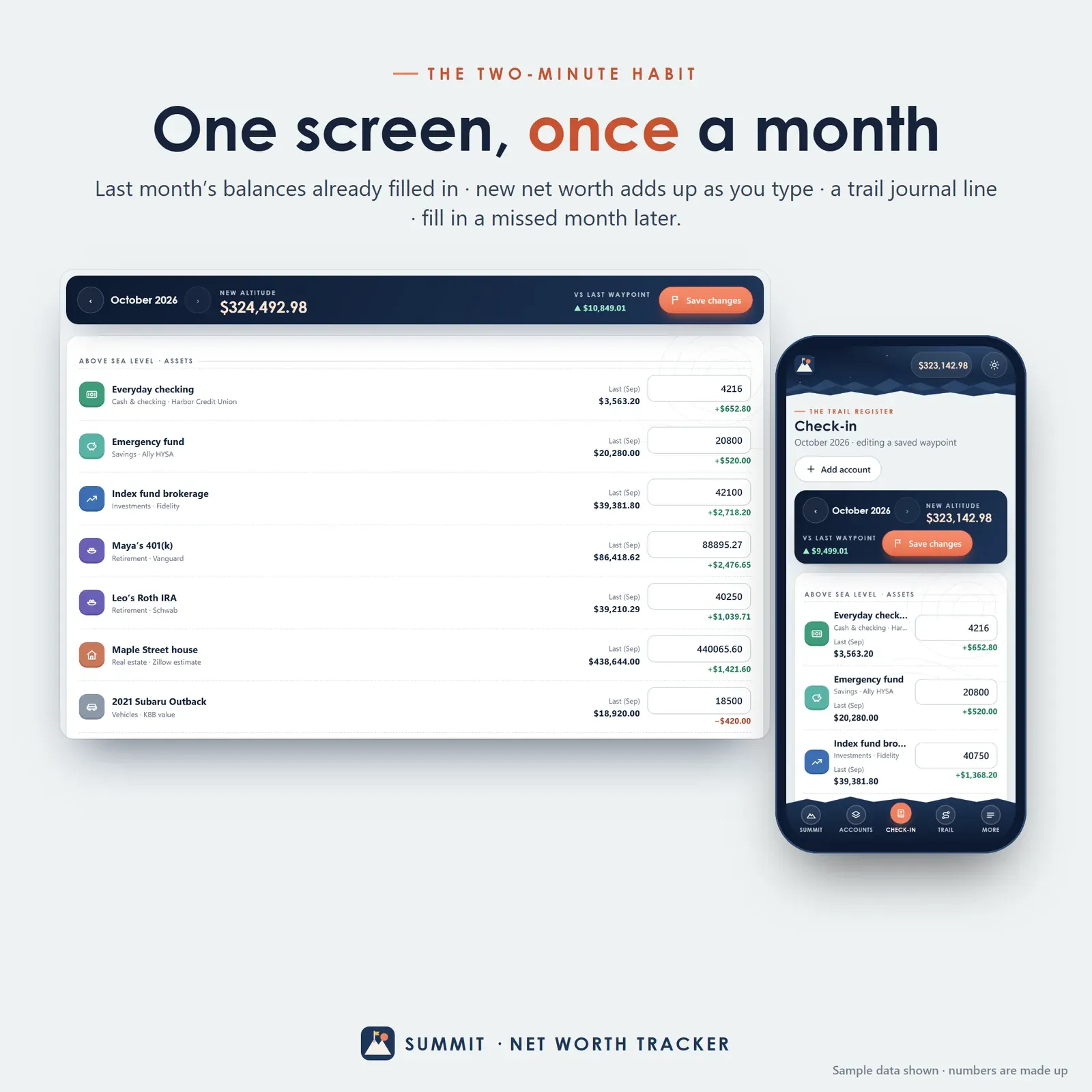
Monthly check-in with every account balance on one screen and the new net worth adding up live
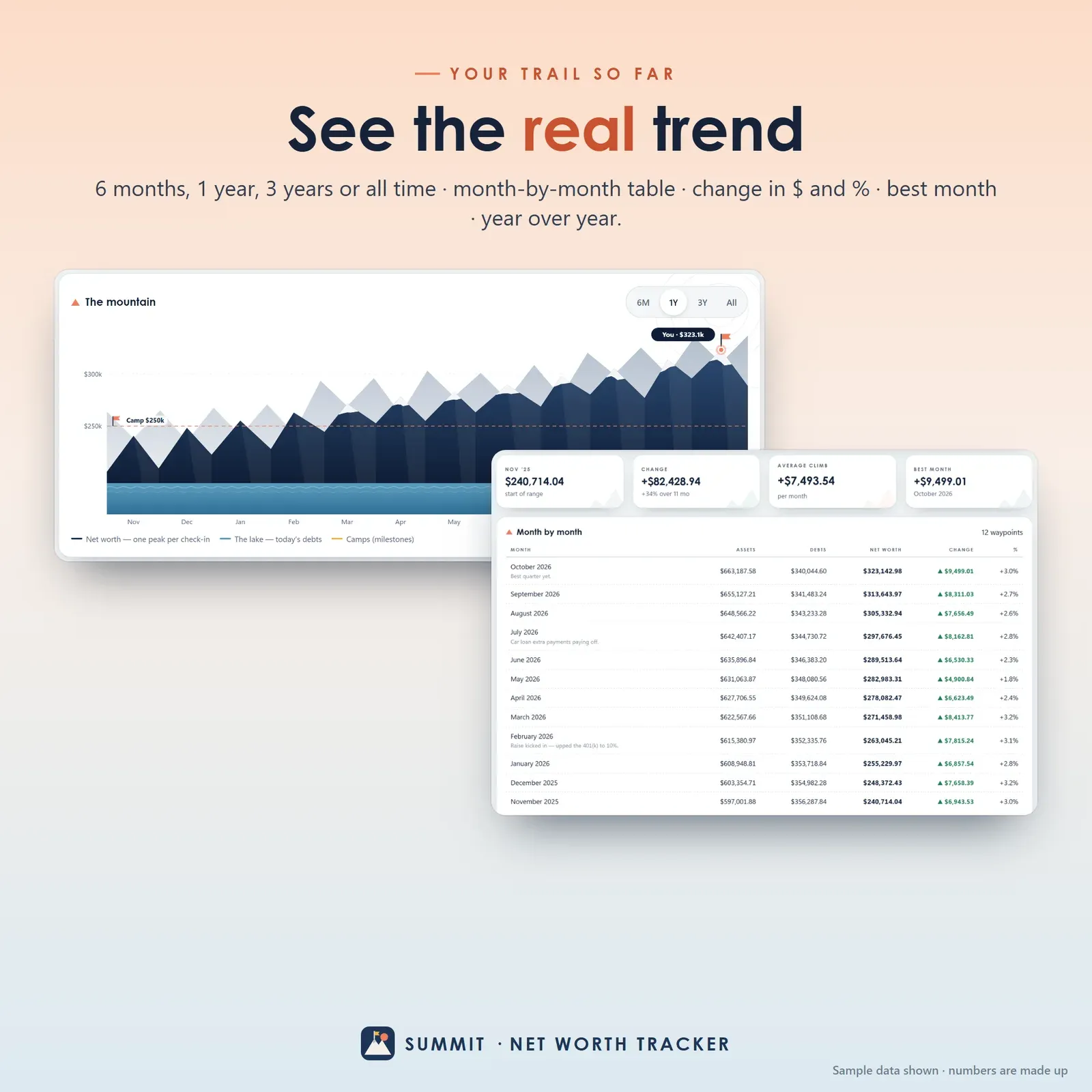
Net worth history over 6 months, 1 year, 3 years or all time with a month-by-month table

Net worth milestones from above zero and debt-free to one million dollars with reached dates

What-if forecast for investing a monthly amount with expected growth and extra debt payments
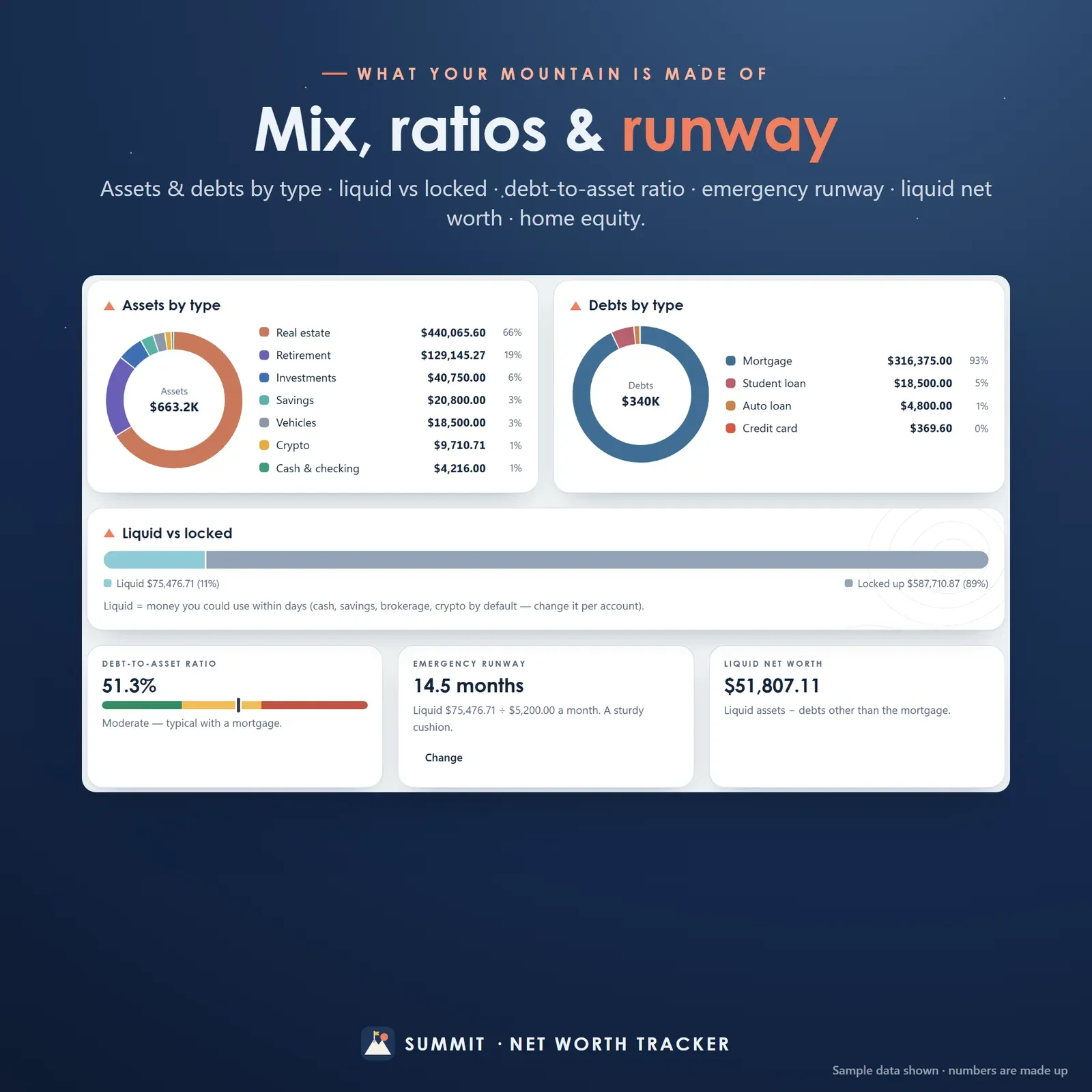
Asset allocation, debt-to-asset ratio, emergency runway, liquid net worth and home equity

Phone and laptop linked with a 6-digit code or QR
Try the live demo with the sample household, the Riveras.
After buying, open Summit from your private link and install it on your phone or computer.
Add your accounts and debts with today's balances.
Check in once a month and watch your net worth climb.
Summit's home screen shows one number first: your net worth, which Summit calls your altitude. Under it is the change this month, this year and over the last 12 months, and then the signature view — a mountain range where every monthly check-in is a peak. As your net worth climbs, so does the range. Snow caps the highest peaks, dashed flag lines mark your milestones, your debts sit in a lake at the foot of the mountain, and a coral flag marks where you are today.
Below the mountain are the four numbers worth knowing: total assets, total debts, liquid net worth and your debt-to-asset ratio. Trail notes pick out what changed: the account that moved your net worth most this month, how many months in a row you've climbed, how much debt you've paid down since you started, and your best month so far. New to the terms? Our free net worth calculator works out the same numbers in a minute, and the guide How to calculate your net worth walks through a full example.
Summit groups your accounts the way you think about them. Above sea level are your assets — cash and checking, savings and emergency funds, investments and brokerage accounts, retirement accounts such as a 401(k) or IRA, real estate, vehicles, crypto, a business and valuables. Below sea level are your debts — credit cards, student loans, auto loans, a mortgage, personal and medical loans.
Each account has a type, the bank or place it's held, an optional interest or growth rate, a note and a liquid flag that Summit sets from the type (you can change it). Link a mortgage to its home and Summit shows your home equity. Close an account and you can archive it: it leaves future check-ins but stays in your history, so past months never change. A colour band shows your mix at a glance, and every row has its latest balance, the change since last month and a small trend line.
A net worth tracker only works if you keep it up, so the check-in is designed to be quick. Open Check-in and every account is listed with last month's balance already filled in. Update what changed — the brokerage, the 401(k), the card balance — and the new net worth adds up at the top as you type, with the change on each row. Add a line to the trail journal ("bonus went to the brokerage") and save the waypoint.
Missed a month? Step back with the arrows and fill it in. Need to update one number mid-month? Tap the account and choose Update balance: it goes straight into this month's check-in. The trail log lists every waypoint with its net worth, the change, your note and any milestone reached that month.
The Trail page is your net worth over time: the full mountain for 6 months, 1 year, 3 years or all time, plus an above-and-below sea level chart with assets as bars, debts below zero and net worth as a line. Four tiles give the starting point, the total change, your average monthly climb and your best month. The month-by-month table lists assets, debts, net worth and the change in dollars and percent, and a year-over-year table shows how each year started and ended and how much debt you paid down.
Seeing the trend matters more than any single number. A market dip shows up as one lower peak in a rising range, not as a reason to panic.
Summit calls milestones camps. The built-in ones are net worth above $0, debt-free (every debt except the mortgage paid off), and $10k, $25k, $50k, $100k, $250k, $500k and $1M. Add your own for anything that matters to you — a house deposit, one year of expenses, a round number. Each camp shows the month you first reached it, or how far away it is and about how long it will take at your current pace. Cross a new one in a check-in and Summit plants a flag and celebrates with you.
Set a summit goal — an amount and an optional date — and Summit shows a progress peak, your arrival date at the current pace, and how much you'd need each month to arrive on time. The pace comes from your own history: the average monthly change across your last 12 check-ins.
The Forecast page is a simple route planner. Type how much you'd invest each month, an expected yearly growth rate, any extra debt payment, and how many years to look ahead. Summit grows your investable assets (investments, retirement and crypto) at that rate, keeps your home, car and cash flat, and uses the extra payment to clear debts first — the mortgage last — before rolling it into investing.
You see where you'd be in 10, 20 or 30 years, when you'd reach your goal and $1M, when you'd be debt-free, how much you put in and how much growth added — next to your current trend line and a year-by-year table. Save a route to compare plans side by side. The maths is the same compound growth our compound interest calculator uses; real returns go up and down, so treat it as a planning aid.
The Mix page shows what your net worth is made of:
A "How are these worked out?" panel explains every number.
Many people track net worth as a household. Add your partner's name in Settings and every account gets an owner: you, your partner or joint. A switch on each page moves between Household and each person's view, and joint accounts count at half in a personal view — so each of you can see your own progress while the household number stays whole. Link your phones and a laptop and you all see the same numbers.
Anyone who wants their whole financial picture in one place without connecting a bank: young professionals starting to invest, couples building wealth together, FIRE and early-retirement savers watching for their number, and people paying off debt who want to see the lake shrink while the mountain grows. If you're focused on a monthly budget instead, Vault is our personal finance dashboard; for paying off debt with snowball or avalanche, try Zero; and to build savings with a challenge, there's Nest.
Summit has no account, no bank login and no tracking. Your balances stay on your own devices. Link your phone and computer once with a 6-digit code or QR, and a balance updated on one shows on the other a moment later — encrypted on the device before it travels. Backup and restore take one file.
Summit installs from your private link on iPhone, iPad, Android, Mac, Windows and Chromebook and works offline once installed. Any currency works. Three themes — Daylight, Night climb and Alpenglow — keep the mountain look.
Summit is a tracking and planning tool, not financial, investment or tax advice. Forecasts, arrival dates and ratios are estimates based on the numbers you enter. It needs internet the first time you open it on each device and works offline after that.
Free tools
Quick answers with the same maths — then let the app keep them up to date.
Your 3–6 month emergency fund target — and when you'll reach it.
Open calculatorFuture balance with monthly contributions, chart and year-by-year table.
Open calculatorHow many years your savings last — or what you can withdraw each month.
Open calculatorFurther reading

Personal Finance
Net worth is everything you own minus everything you owe. Here's how to list your assets and debts, value your home and car honestly, work out liquid net worth and debt-to-asset ratio, and track the number monthly so you can see real progress.

Personal Finance
How much emergency savings you really need, worked out step by step: add up your essentials, choose three, six or more months, and turn the total into a monthly plan you can actually reach.

Personal Finance
A complete $1,500 holiday budget, built line by line — gifts, travel, food and decor — with the Christmas savings plan that pays for it in cash and the simple tracking that keeps it on course through December.
More from VaultlyApps
 Live
Live

Personal Finance Dashboard
Your whole money picture on one private dashboard — safe-to-spend, budgets, bills, goals, debt payoff and net worth, on your phone and laptop.
 Live
Live

ADHD Budget Planner
A calm budget planner designed for ADHD brains — one Safe to Spend number, 3-tap logging, focus mode and kind overspend fixes instead of red warnings.
 Live
Live

Debt Payoff Planner
See your debt-free date, compare the snowball and avalanche methods side by side, and watch extra payments pull the finish line closer.
The live demo runs in your browser with realistic sample data. Nothing to install, nothing to sign up for.
We use optional cookies for anonymous analytics. Nothing optional is set until you choose. Cookie policy
This site currently uses no analytics or advertising cookies. It only remembers your light/dark preference in your own browser.
Essential
Theme preference and this choice. Always on.