VaultlyApps
Live Web app (installable PWA)

Nest

Savings Challenge Tracker

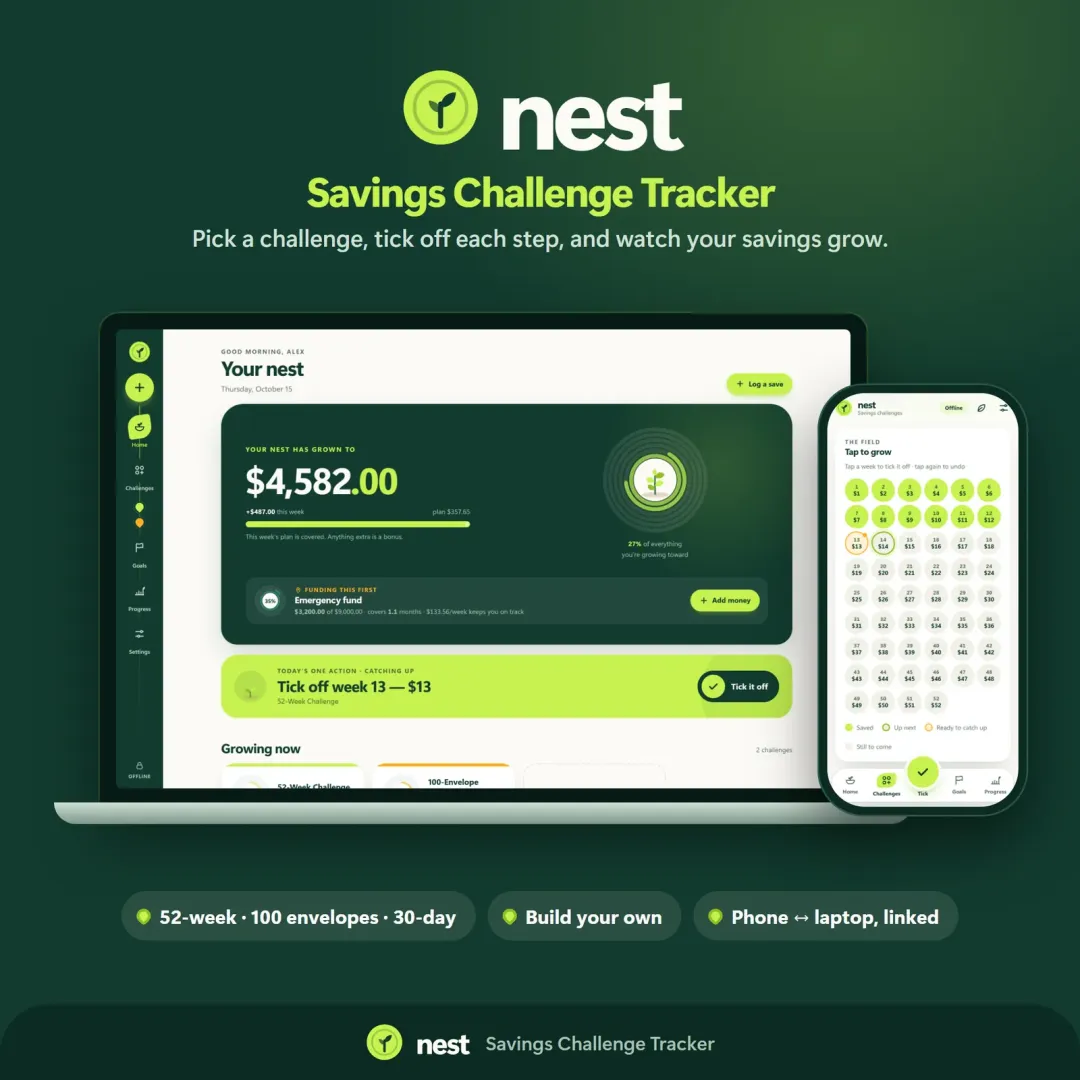
Run a 52-week, 365-day, no-spend or custom savings challenge and watch your savings grow — with goals, an emergency fund tracker and kind catch-up options.

Try the live demo to explore the application — it runs right here on VaultlyApps with sample data, no sign-up needed.

Nest savings challenge tracker with growth rings and a savings garden

What is Nest?

Nest is a savings challenge tracker. It includes ready-made challenges — 52-week, 365-day penny, no-spend, 100-envelope, 26 paydays and 30-day — plus a custom challenge builder, savings goals with target dates and an emergency fund tracker. Progress is shown as something that grows, from a seed to a young tree.

What problem does Nest solve?

Saving is hard to stick with because progress is invisible — money in a savings account just sits there. Nest makes each deposit visible and gives you a plan, a pace and a finish date, so it is easier to keep going.

Key features

  • Savings challenge library

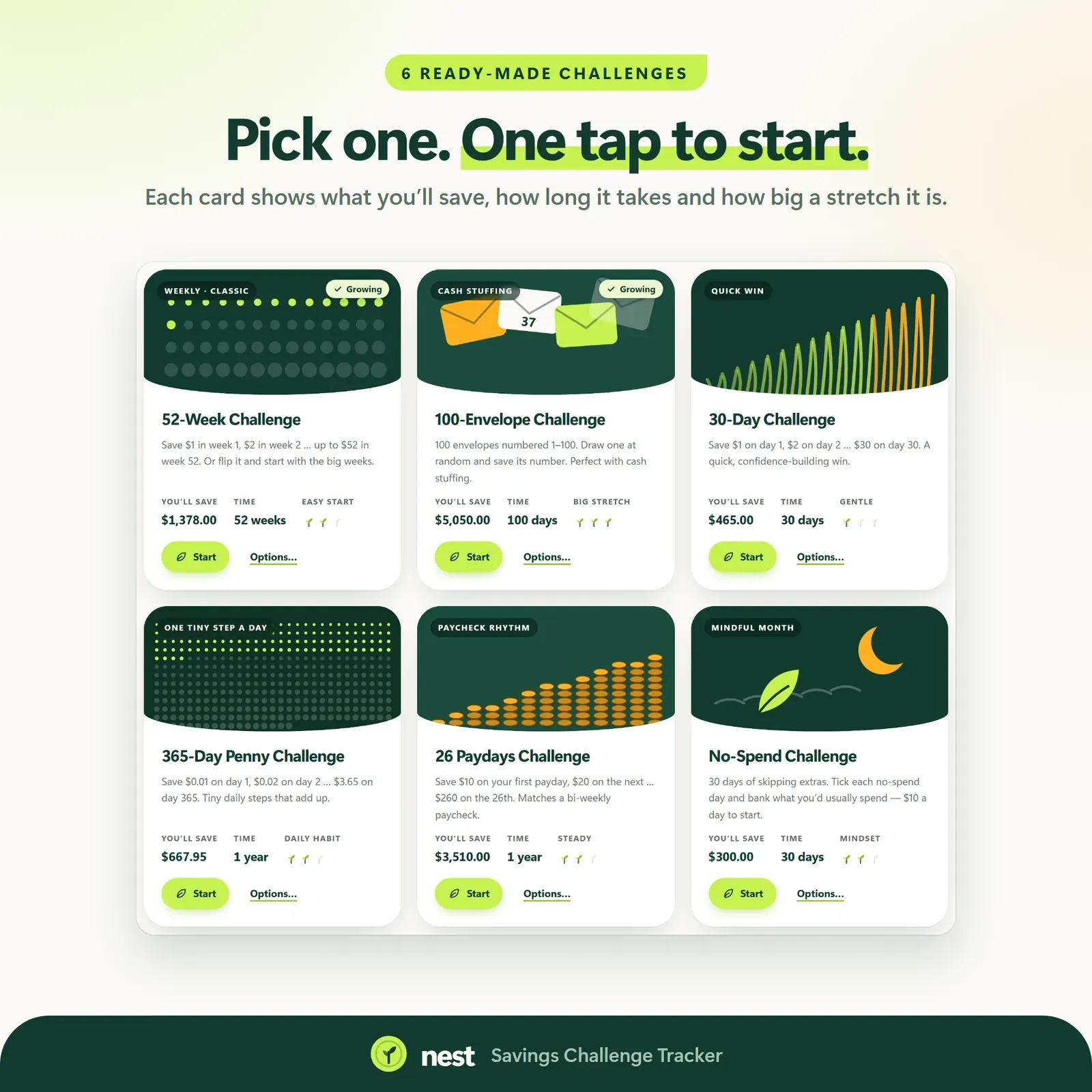
    52-week, 365-day penny, no-spend days, 100 envelopes with a random draw, 26 paydays and 30-day challenges, each with a one-tap tick board.

  • Custom challenge builder

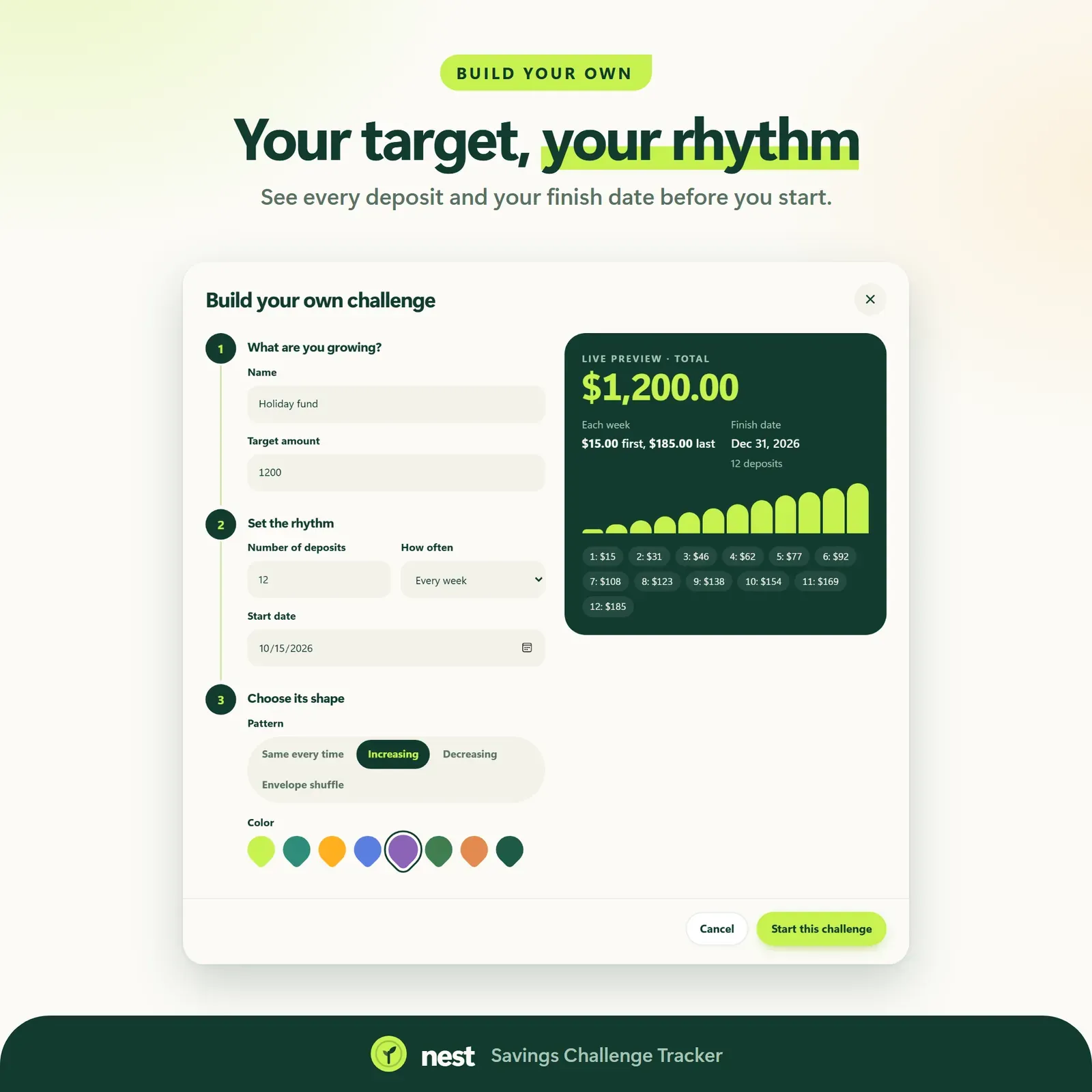
    Any target, any timeline, with a live preview before you start.

  • Savings goals

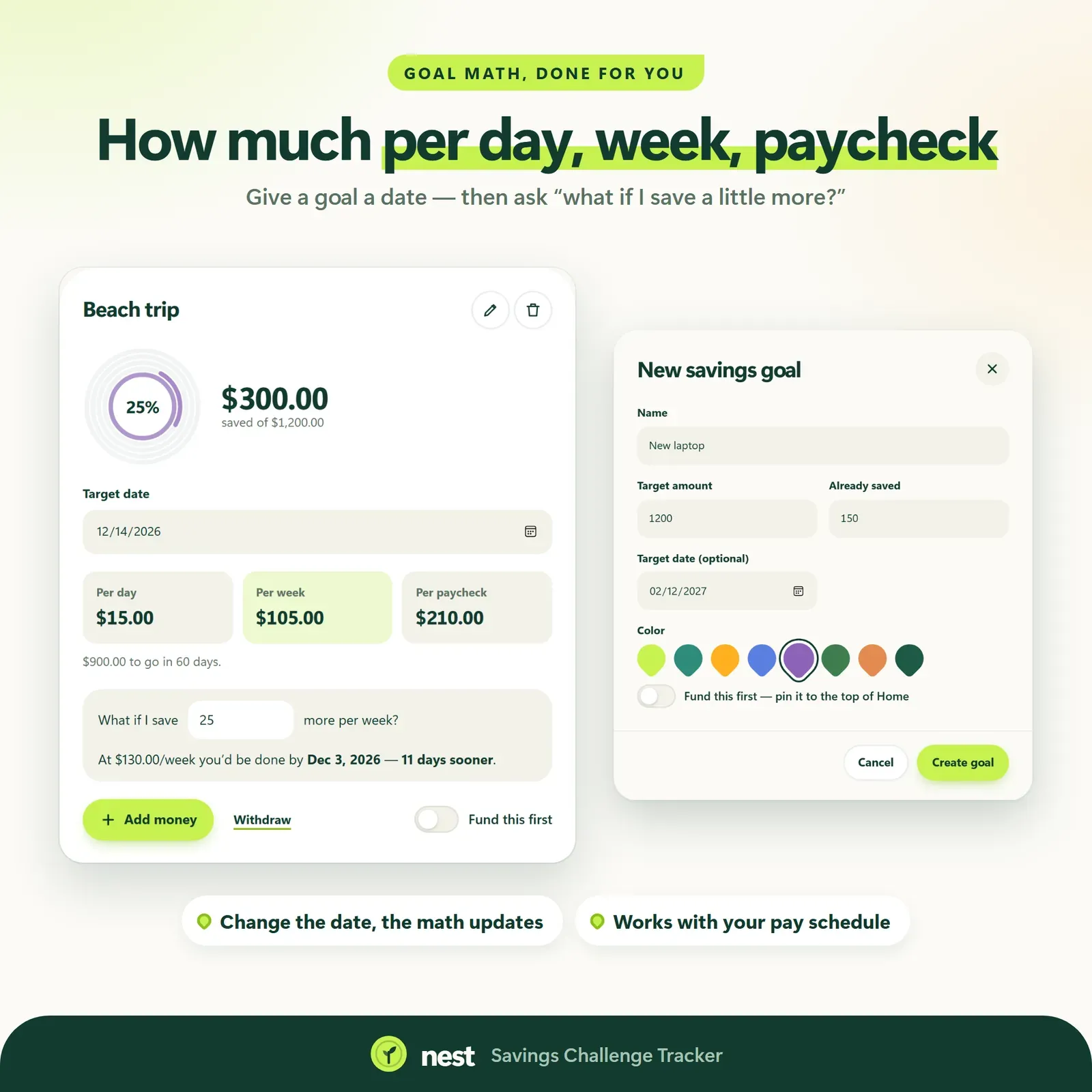
    Goals with target dates, with the maths done for you per day, per week and per paycheck. Use them as sinking funds for big expenses.

  • Emergency fund tracker

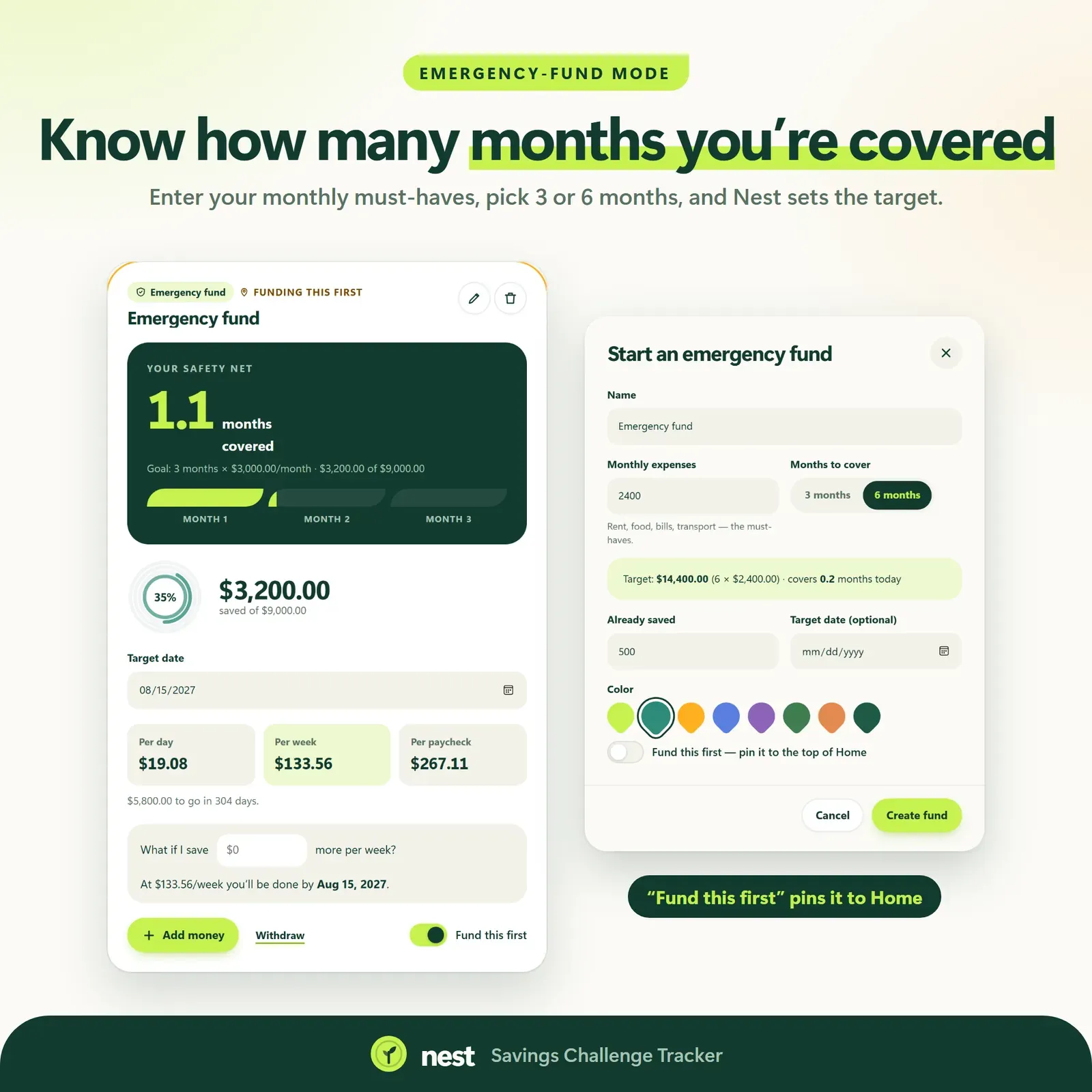
    See how many months of expenses you have covered, with a "fund this first" mode.

  • Watch it grow

    Streaks grow from seed to sprout to sapling to young tree, and each challenge fills outward like tree rings.

  • At-this-pace projections

    A finish date based on your real progress, and what-ifs like "what if I save $20 more a week?"

  • Kind catch-up

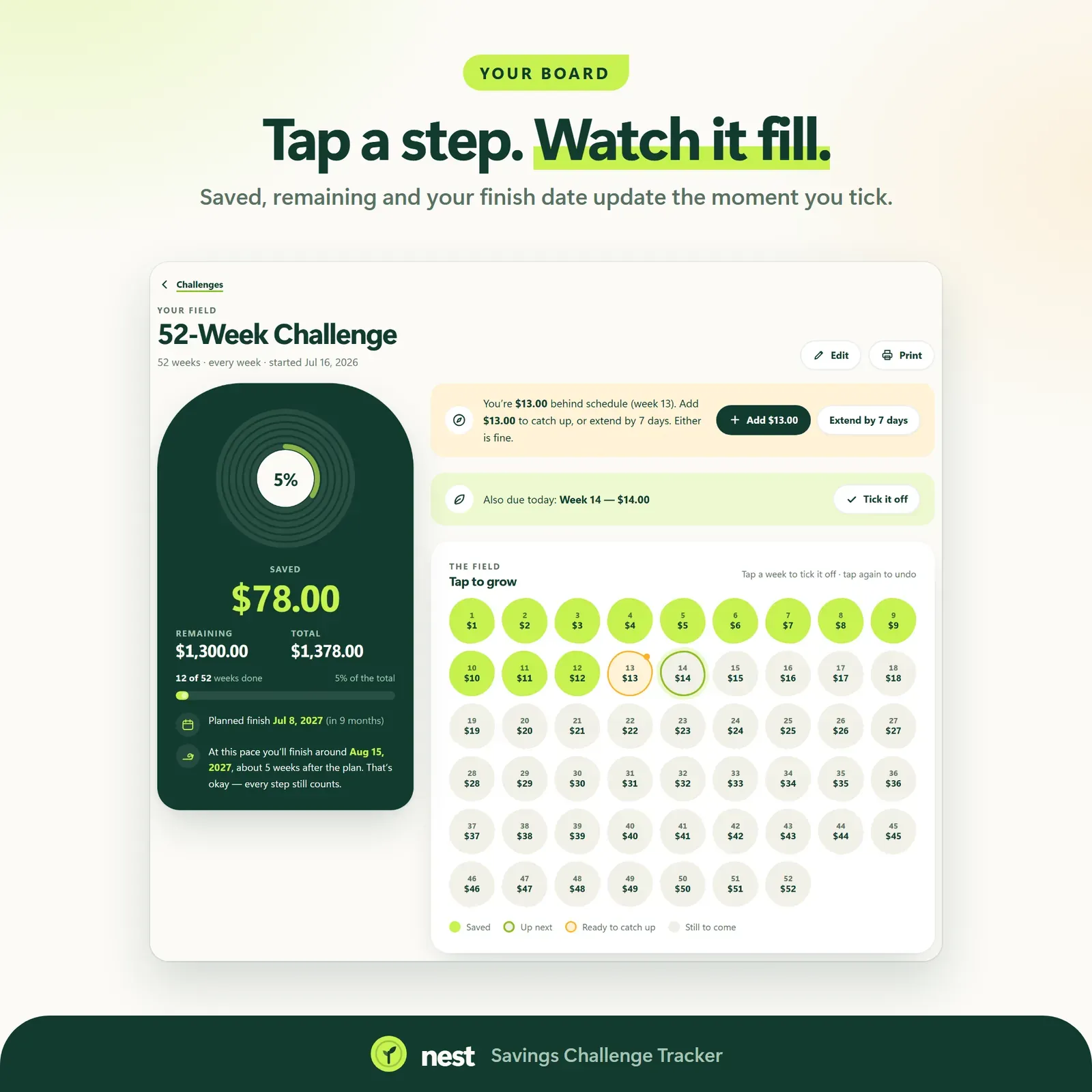
    Fell behind? Add a little extra or stretch the timeline — no guilt.

  • Linked devices

    Log a save on your phone and see it on your laptop. Encrypted, up to 4 devices.

Screenshots

  • The savings challenge library with 52-week, 365-day and no-spend challenges

    The savings challenge library with 52-week, 365-day and no-spend challenges

  • A challenge board where each saved amount blooms when ticked

    A challenge board where each saved amount blooms when ticked

  • Savings goals with target dates and per-week amounts

    Savings goals with target dates and per-week amounts

  • Emergency fund tracker showing months of expenses covered

    Emergency fund tracker showing months of expenses covered

  • Custom challenge builder with a live preview

    Custom challenge builder with a live preview

How does Nest work?

  1. 1

    Try the live demo with sample challenges and goals.

  2. 2

    After buying, install Nest from your private link.

  3. 3

    Pick a challenge or create a goal.

  4. 4

    Tick off each save as you make it and watch your progress grow.

Who is Nest for?

  • People starting a 52-week or 365-day savings challenge
  • Anyone building an emergency fund
  • People saving for a specific goal with a deadline
  • Savers who stay motivated by visible progress

Saving you can see

Nest is built on the idea that people keep doing what they can watch grow. Every challenge has a board, every tick makes something bloom, and streaks grow through stages — seed, sprout, sapling, young tree. Each challenge fills outward like the rings of a tree. The home screen tells the story of your savings from top to bottom.

A library of savings challenges

Pick a challenge and start today:

  • 52-week challenge — the classic weekly climb from $1 to $52, for $1,378 in a year.
  • 365-day penny challenge — a little every day, $667.95 by the end.
  • No-spend challenge — count your no-spend days.
  • 100-envelope challenge — with a random envelope draw.
  • 26 paydays and 30-day challenges for people who think in paychecks or months.
  • Your own challenge — any target and timeline, with a live preview.

Every challenge has a one-tap tick board. Not sure which to choose? Our 52-week savings challenge guide compares the main variations, including versions for people paid every two weeks.

A plan, a pace and a finish date

For each goal, Nest works out how much you need per day, per week and per paycheck to hit your target date. As you save, the "at this pace" projection updates with a realistic finish date based on what you've actually done. If you fall behind, Nest offers specific ways to catch up — add a little extra or stretch the timeline — instead of a red warning.

What-if scenarios answer questions like "what if I save $20 more a week?" with how much sooner you'd get there.

Goals, sinking funds and your emergency fund

Savings goals with target dates keep every financial goal in one calm place. Many people use them as sinking funds: saving a little each month for the big expenses — insurance, holidays, car repairs — before they arrive. Our article on safe to spend shows how sinking funds keep a monthly budget steady.

The emergency fund tracker measures your savings in months of expenses covered, which is a far clearer milestone than a round number. "Fund this first" mode puts it ahead of other goals until it's done.

Who Nest is for

  • People starting from zero who want a gentle, structured way to begin.
  • Savers with several goals — an emergency fund, a trip, a car, gifts — who want them in one place.
  • Families who like a visible, shared challenge.
  • Anyone paying down debt who wants a starter emergency fund so the next surprise doesn't land on a credit card. See debt snowball vs avalanche for how the two fit together.

A typical week with Nest

  1. Payday: move this week's amount to your savings account, then tick it off in Nest.
  2. Watch it grow: the board blooms, the streak grows, the growth rings fill.
  3. If you miss a week: choose a catch-up option instead of starting over.
  4. Once a month: check the monthly savings chart and the "at this pace" finish dates.

Nest is a tracker: it doesn't move or hold your money. You keep your savings in your own bank account and record each save in Nest.

Why visual progress works

Saving is unusual among money habits: when it's going well, nothing happens. The money just sits there, and it's easy to feel you've achieved nothing. Nest makes the invisible visible.

  • Every save produces a reaction — a bloom on the board, a ring filling out, a streak growing.
  • Milestones are concrete. "Two months of expenses covered" means more than a balance.
  • Setbacks are softened. A missed week changes a projection, not your progress, and catch-up options turn it into a plan.

None of this changes the maths of saving. It changes how likely you are to keep going long enough for the maths to work.

Privacy and devices

Nest has no account and no bank login. Your data stays on your own devices. Link your phone and laptop once with a 6-digit code or QR, and a save logged on your phone appears on your laptop a moment later — encrypted on the device before it travels. A device that was offline catches up when it reconnects.

Nest installs from your private link on iPhone, iPad, Android, Mac, Windows and Chromebook and works offline once installed. It has four calm themes (Meadow, Pine, Light and Dark), 30 currencies, keyboard shortcuts, printable reports and challenge boards, and JSON backup and restore.

What you get

  • Your private Nest link and QR code.
  • A 25-page PDF guide: Start Here, How to Open & Install, How Nest Works and the license.
  • Bonus printables: 6 savings challenge boards, 7 savings worksheets (monthly budget, bill tracker, subscription audit, emergency fund, savings goals, net worth tracker, year at a glance) and 5 wallpapers.
  • Free updates for the app itself.

Getting started

  1. Open your private link from the Start Here page and install Nest.
  2. Explore the sample savings garden with the guided tour.
  3. Clear the samples and pick a challenge or create a goal with a target date.
  4. Tick off your first save — and watch it grow.

Flow shows what's safe to spend each week, so you know how much can go to savings. Vault combines goals and challenges with a full budget and net-worth tracker.

Good to know

Nest is a tracker — it doesn't move or hold your money — and it is a motivation tool, not financial advice.


Nest FAQ

How does the 52-week savings challenge work?

You save an increasing amount each week — $1 in week 1, $2 in week 2, up to $52 in week 52 — for a total of $1,378. Nest tracks each week for you, and its custom challenge builder lets you set your own target and timeline.

Does Nest hold or move my money?

No. Nest is a tracker. You move money in your own bank; Nest records it and shows your progress.

What if I miss a week?

Nest offers kind catch-up options — add a little extra later or stretch the timeline — instead of marking the challenge as failed.

Can I track more than one challenge at a time?

Yes. You can run several challenges and goals side by side.

Is there a subscription?

No. Nest is a one-time purchase with free updates, and it has no account.

Can Nest track an emergency fund?

Yes. The emergency fund tracker shows how many months of expenses your savings cover, and a "fund this first" mode puts it ahead of other goals until it reaches your target.

Can I make my own savings challenge?

Yes. The custom challenge builder lets you set any target and timeline and shows a live preview of the board before you start.

How does Nest work out how much I need to save?

For each goal with a target date, Nest calculates the amount per day, per week and per paycheck. As you save, the "at this pace" projection shows a realistic finish date based on what you've actually saved.

Further reading

Related articles

All articles
Debt Snowball vs Debt Avalanche: Which Pays Off Debt Faster?

Personal Finance

Debt Snowball vs Debt Avalanche: Which Pays Off Debt Faster?

The snowball method pays the smallest balance first; the avalanche method pays the highest interest rate first. Here's how they compare on the same debts, with real numbers — plus the hybrid method and how to choose.

11 min read
What Is a Safe-to-Spend Number (and How Do You Calculate It)?

Personal Finance

What Is a Safe-to-Spend Number (and How Do You Calculate It)?

Your bank balance isn't what you can spend. A safe-to-spend number subtracts bills, savings and planned spending first — here's the formula, worked examples for monthly, weekly and irregular pay, and the mistakes to avoid.

11 min read

More from VaultlyApps

Related projects

All projects
Vault personal finance dashboard shown on a laptop and a phone, with the safe-to-spend number and cash-flow charts Live

Vault

Personal Finance Dashboard

Your whole money picture on one private dashboard — safe-to-spend, budgets, bills, goals, debt payoff and net worth, on your phone and laptop.

Flow ADHD budget planner showing a calm Safe to Spend screen Live

Flow

ADHD Budget Planner

A calm budget planner designed for ADHD brains — one Safe to Spend number, 3-tap logging, focus mode and kind overspend fixes instead of red warnings.

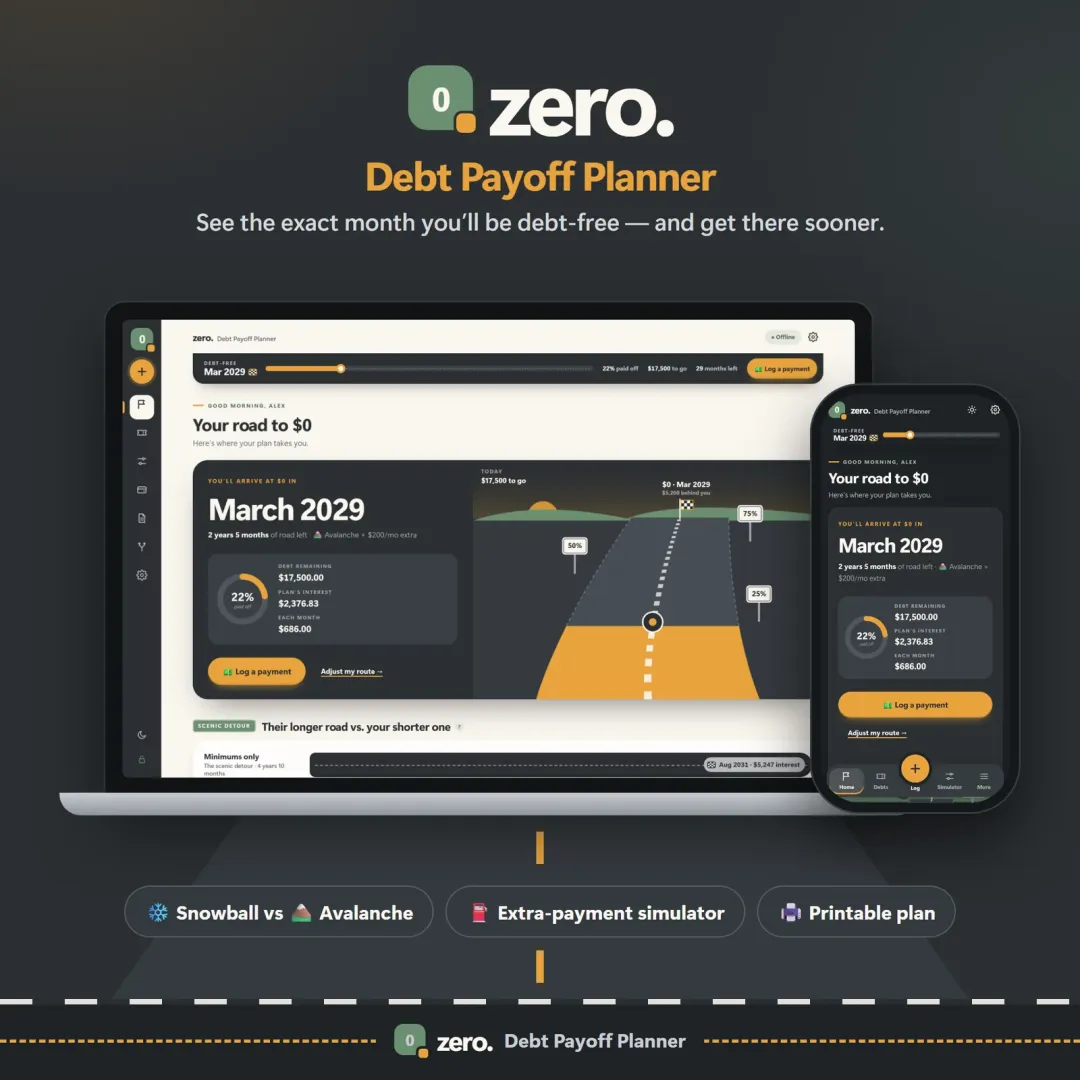
Zero debt payoff planner with a road leading to a $0 finish flag and the projected debt-free date Live

Zero

Debt Payoff Planner

See your debt-free date, compare the snowball and avalanche methods side by side, and watch extra payments pull the finish line closer.

See Nest in action

The live demo runs in your browser with realistic sample data. Nothing to install, nothing to sign up for.

We use optional cookies for anonymous analytics. Nothing optional is set until you choose. Cookie policy