VaultlyApps
Live Web app (installable PWA)

Zero

Debt Payoff Planner

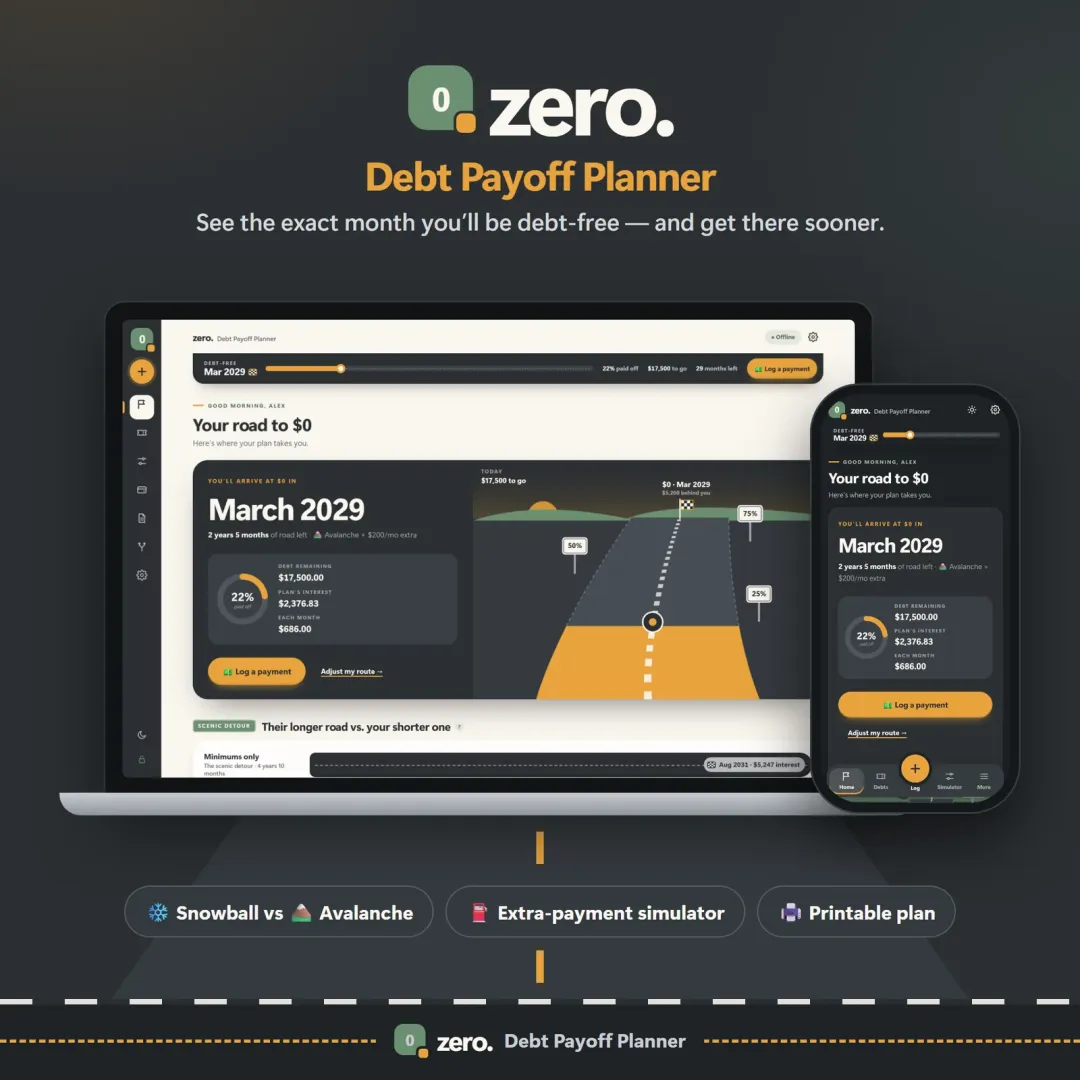
See your debt-free date, compare the snowball and avalanche methods side by side, and watch extra payments pull the finish line closer.

Try the live demo to explore the application — it runs right here on VaultlyApps with sample data, no sign-up needed.

Zero debt payoff planner with a road leading to a $0 finish flag and the projected debt-free date

What is Zero?

Zero is a debt payoff planner and simulator. You enter each debt's balance, interest rate (APR) and minimum payment, and Zero calculates your debt-free date, total interest and payoff order under the snowball, avalanche or a custom strategy, then lets you test extra payments and lump sums to see how much sooner you could finish.

What problem does Zero solve?

Debt feels endless when there is no visible finish line, and it's hard to know whether to attack the smallest balance or the highest interest rate first. Zero turns a pile of balances into a specific date and shows, in dollars, what each strategy and each extra payment is worth.

Key features

  • Your debt-free date

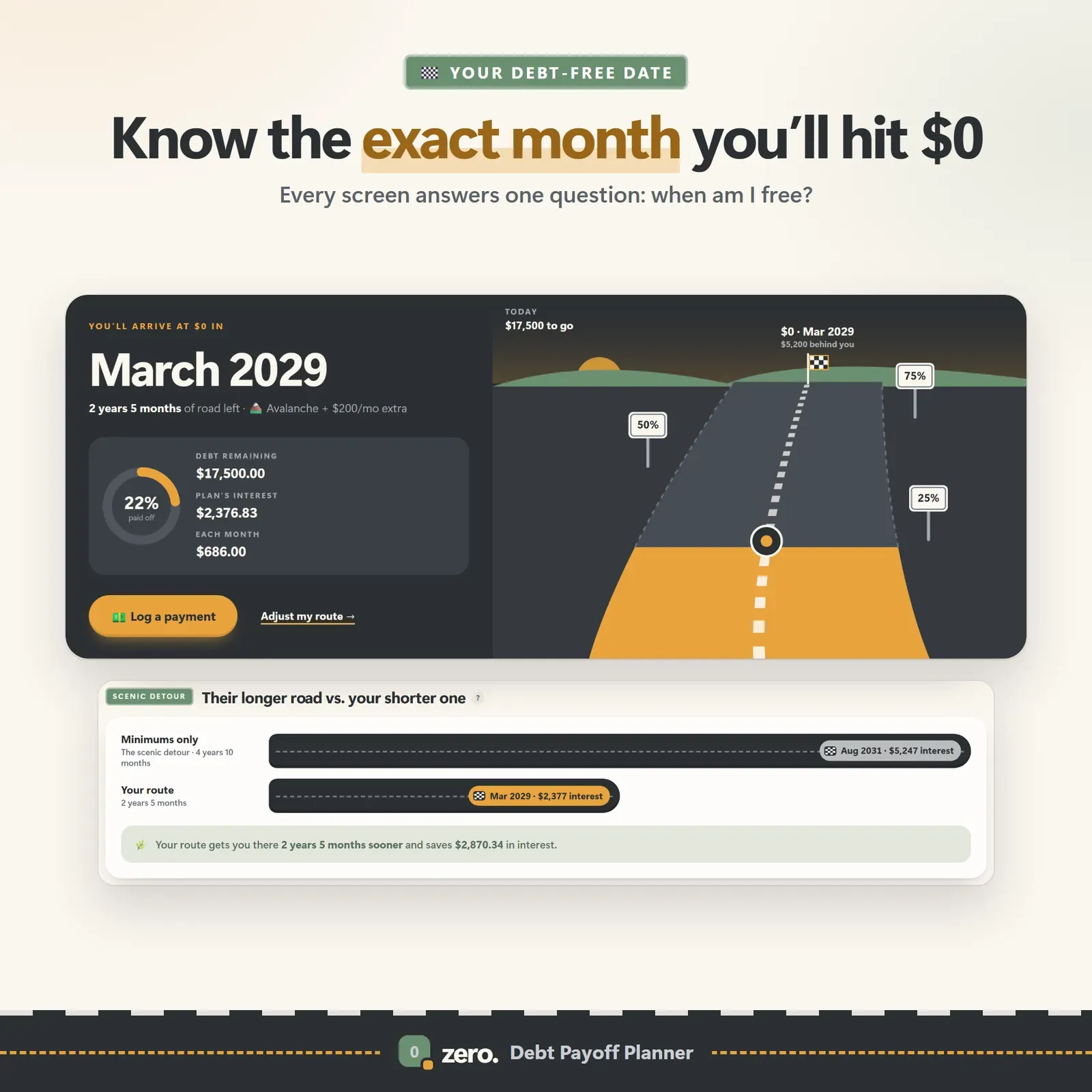
    The answer to "when am I free?" on every screen, along with total interest, total paid and how far along you are.

  • Snowball vs avalanche

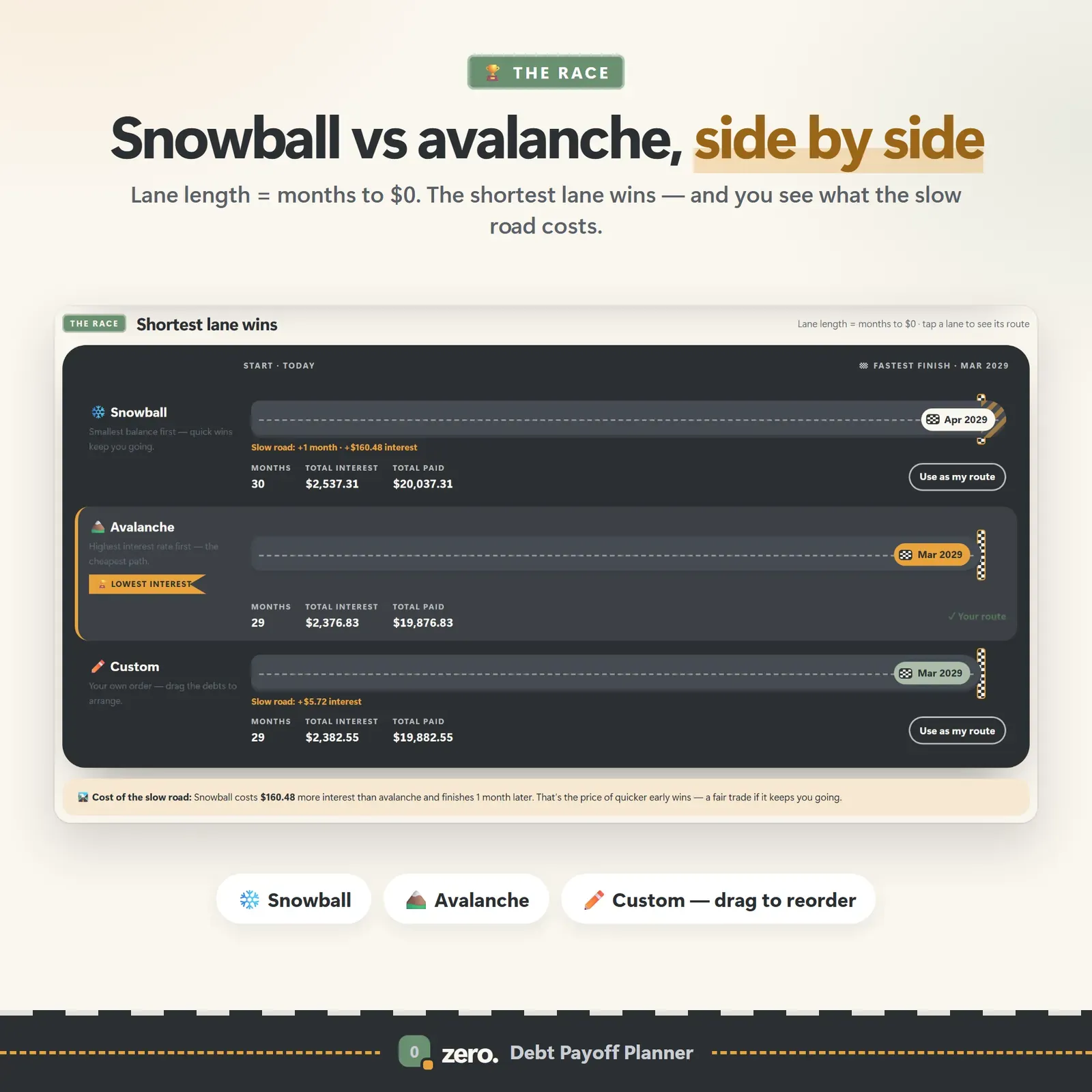
    Smallest balance first or highest APR first — or your own order — compared side by side, with a "lowest interest" badge on the cheaper plan.

  • Extra-payment slider

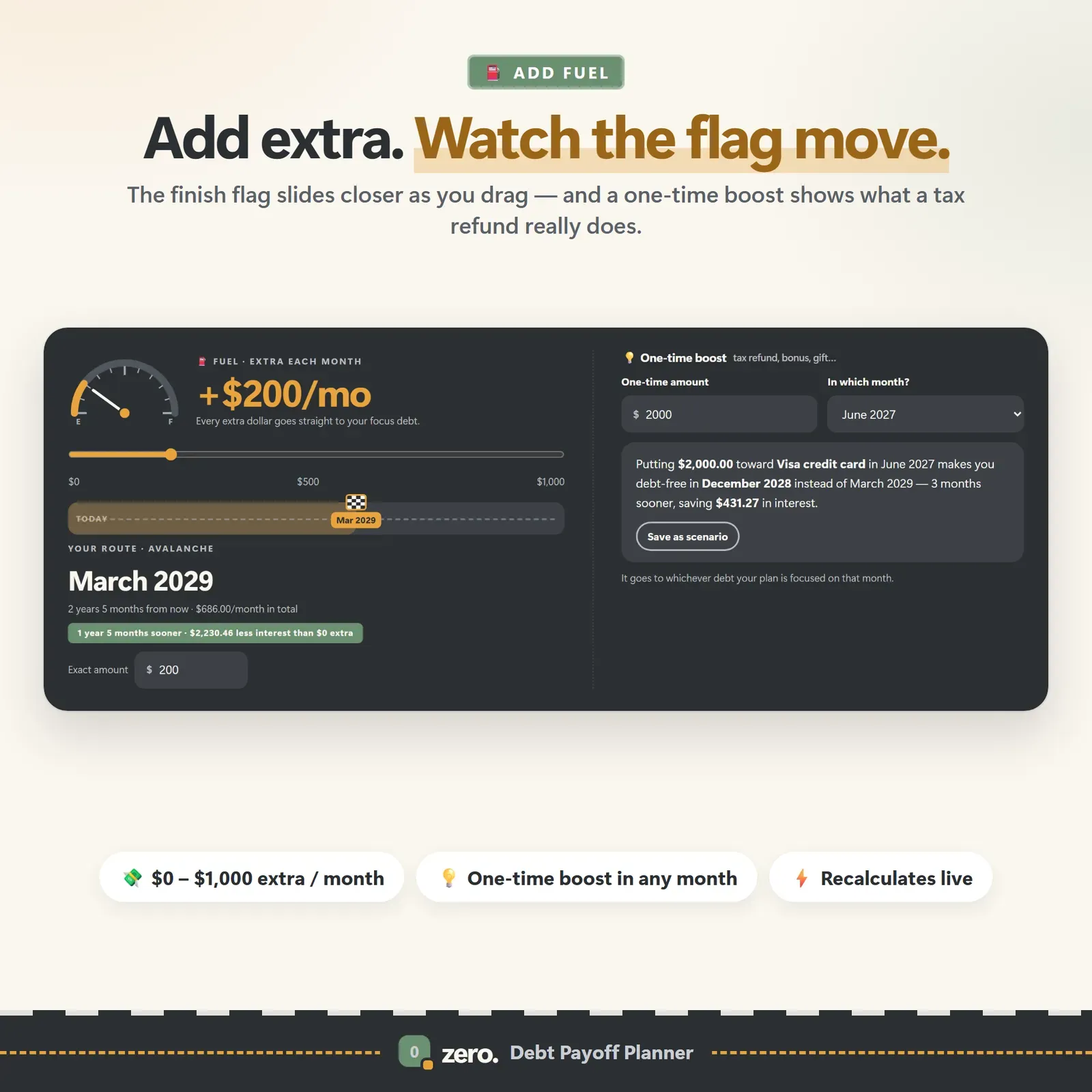
    Drag the slider and watch the debt-free date move closer, live, with the interest saved.

  • Lump-sum what-ifs

    Test ideas like "what if I put $2,000 toward debt in June?" and save scenarios to compare.

  • Minimums-only contrast

    See exactly what paying only the minimums would cost you in time and interest.

  • Payment log

    Log real payments in seconds; balances and the progress ring update by themselves.

  • Printable payoff plan

    A month-by-month debt payoff plan you can print or save as PDF.

  • Milestone celebrations

    A road-trip view with 25, 50, 75 and 100% milestones — motivational, never shaming.

Screenshots

  • The debt-free date with total interest and progress

    The debt-free date with total interest and progress

  • Extra-payment slider moving the debt-free date closer

    Extra-payment slider moving the debt-free date closer

  • Snowball, avalanche and custom strategies compared as lanes on a track

    Snowball, avalanche and custom strategies compared as lanes on a track

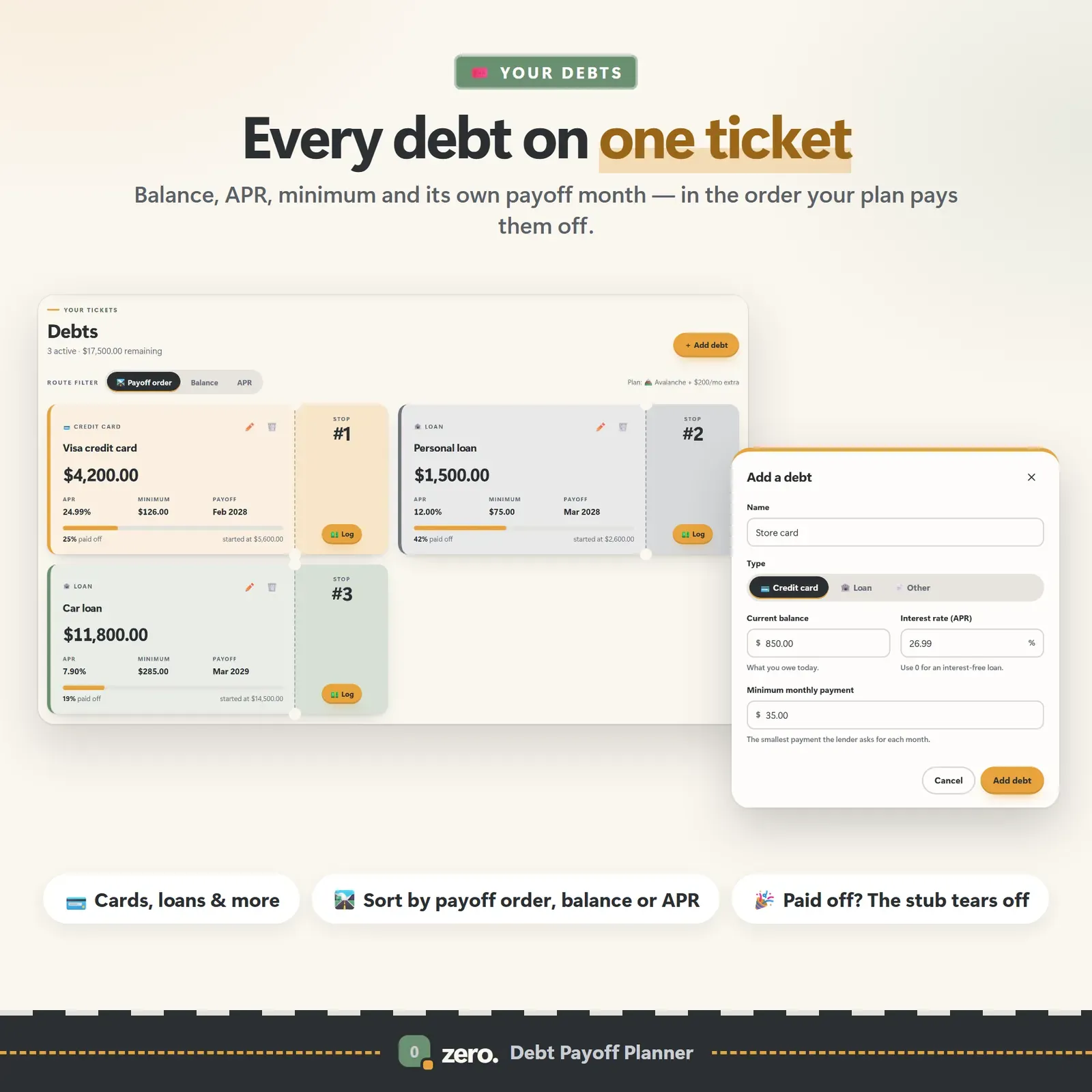
  • Debt tickets showing balance, APR, minimum payment and payoff month

    Debt tickets showing balance, APR, minimum payment and payoff month

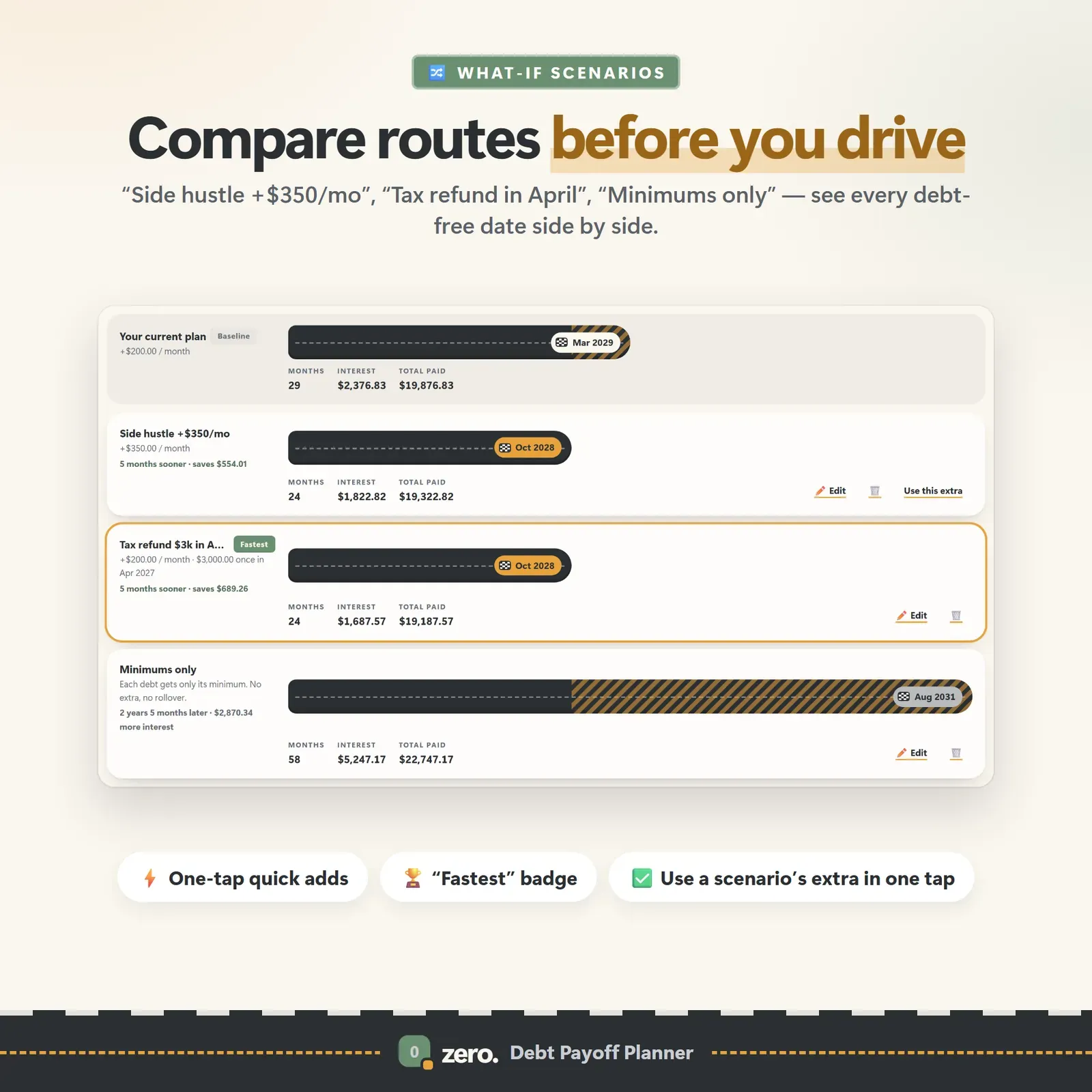
  • Saved what-if scenarios compared side by side

    Saved what-if scenarios compared side by side

How does Zero work?

  1. 1

    Open the live demo, which comes with sample debts and a guided tour.

  2. 2

    After buying, install Zero from your private link.

  3. 3

    Add each debt with its balance, APR and minimum payment.

  4. 4

    Compare strategies, set an extra payment you can sustain, and log payments as you make them.

Who is Zero for?

  • Anyone paying off credit cards
  • car loans or personal loans
  • People deciding between the debt snowball and debt avalanche methods
  • Couples planning a shared payoff
  • People who want a date to aim for rather than a vague goal

From balances to a finish line

Zero treats debt payoff as a trip with a destination. Every card and loan becomes a debt ticket with its balance, APR, minimum payment and projected payoff month. Together they produce one date — the day you reach $0 — shown on every screen, alongside total interest, total paid and how far along you are.

The road-trip view marks milestones at 25, 50, 75 and 100 percent, so progress feels like distance travelled rather than a balance that barely moves.

Snowball, avalanche or your own order

The strategy race compares the snowball method, the avalanche method and your own custom order as lanes on a track: the longer the lane, the more months it takes. The cheaper strategy gets a "Lowest interest" badge, so you don't have to do the arithmetic.

  • Snowball pays the smallest balance first for quick wins.
  • Avalanche pays the highest APR first, usually the cheapest way out.
  • Custom lets you choose — for example one small balance first, then highest interest.

A minimums-only comparison shows what the slow road really costs. If you want to understand the methods before choosing, read Debt snowball vs debt avalanche, which compares all three on the same debts with real numbers.

Test before you commit

The extra-payment slider moves your debt-free date as you drag it. Lump-sum what-ifs answer questions like "what if I put $2,000 toward debt in June?" with a new date and the interest saved. Save scenarios such as "$200 extra", "tax refund" and "minimums only" and compare their dates and interest side by side — the fastest route gets a badge.

This is where most people find the surprising result: a modest extra payment every month usually saves more than the choice between methods.

Who Zero is for

  • Anyone with more than one debt — credit cards, store cards, car loans, personal loans, any balance with an APR.
  • People who've tried to pay off debt before and lost motivation because they couldn't see the end.
  • Couples who want one shared plan and a date they can both look at.
  • Planners who like to test ideas before changing anything in real life.

You'll need three numbers for each debt: the balance, the interest rate (APR) and the minimum payment.

Track real payments

When you pay, log it in seconds and the balances update by themselves. The progress ring fills, balances fall, and the debt-free date stays honest. Language throughout is motivational, never shaming — there are no red alarms for a slow month.

A printable month-by-month payoff plan (save as PDF) is useful for the fridge, a partner or a conversation with a credit counsellor.

A typical month with Zero

  1. Start of the month: check the debt-free date and this month's target debt.
  2. Payday: pay every minimum, then send the extra payment to the target debt.
  3. Log the payments on your phone as you make them.
  4. When extra money appears — a refund, a bonus, a cancelled subscription — try it as a lump-sum what-if first, then decide.
  5. Month-end: update any balance that changed on a statement and enjoy the progress ring.

Finding extra money is often easier than it sounds. Our guides to tracking subscriptions and your safe-to-spend number show where it usually hides.

What makes a debt plan stick

The maths of paying off debt is simple. Staying with it for two or three years is the hard part. Zero is designed around the things that keep people going:

  • A date, not just a balance. "Debt-free in August 2028" is easier to hold on to than a number that falls slowly.
  • Visible progress. Milestones at every quarter of the journey and a progress ring that fills with each payment.
  • Early wins if you need them. A snowball or custom order gives you a paid-off account within months.
  • No shame. A slow month is a slow month, not a red alert.
  • Proof that extra payments matter. The slider shows exactly what an extra $50 does, which makes the next $50 easier to find.

Privacy and devices

Zero has no account and no connection to lenders or banks — you enter the numbers. Your data stays on your own devices. Link your phone and laptop once with a 6-digit code or QR, and a payment logged on one appears on the other a moment later, encrypted on the device before it travels. A device that was offline catches up when it's back.

Zero installs from your private link on iPhone, iPad, Android, Mac, Windows and Chromebook and works offline once installed. It has Day and Night themes, 30 currencies, keyboard shortcuts and JSON backup and restore.

What you get

  • Your private Zero link and QR code.
  • A 23-page PDF guide: Start Here, How to Open & Install, How Zero Works and the license.
  • Bonus printables: 7 debt payoff worksheets (debt inventory, payoff order, payment log, debt-free countdown, monthly budget, bill tracker, year at a glance), 6 extra-payment challenge boards and 5 wallpapers.
  • Free updates for the app itself.

Getting started

  1. Open your private link from the Start Here page and install Zero.
  2. Explore the sample debts with the guided tour.
  3. Clear the samples and add each debt's balance, APR and minimum payment.
  4. Set your monthly debt budget — the simulator does the rest.

Vault includes the same snowball and avalanche comparison inside a full budget dashboard. Flow keeps a calm Safe to Spend number in view while you pay debts down, and Nest helps you build the emergency fund that stops new debt.

Good to know

Zero is a planning and motivation tool, not financial advice. Its figures are estimates — real lenders calculate interest daily — and it does not move money or connect to lenders.


Zero FAQ

What is the difference between the debt snowball and debt avalanche methods?

The snowball method pays off the smallest balance first for quick wins. The avalanche method pays off the highest interest rate first, which usually costs less in total interest. Zero shows both side by side with your own numbers.

What information do I need for each debt?

The current balance, the interest rate (APR) and the minimum monthly payment.

Are Zero's numbers exact?

They are planning estimates based on the figures you enter. Your lender's figures may differ slightly, for example because of how and when interest is charged.

Does Zero connect to my lender or bank?

No. You enter your debts yourself, and the data stays on your own devices.

Is there a subscription?

No. Zero is a one-time purchase with free updates.

Can I choose my own payoff order?

Yes. Besides snowball and avalanche, Zero lets you set a custom order — for example clearing one small balance first for momentum and then switching to the highest interest rate.

Can I see what a tax refund or bonus would do?

Yes. Lump-sum what-ifs show the new debt-free date and the interest saved if you put a one-off amount toward debt in a chosen month, and you can save it as a scenario to compare.

Can I print my payoff plan?

Yes. Zero prints a month-by-month debt payoff plan that you can also save as a PDF — handy for the fridge or for talking it through with a partner.

Further reading

Related articles

All articles
Debt Snowball vs Debt Avalanche: Which Pays Off Debt Faster?

Personal Finance

Debt Snowball vs Debt Avalanche: Which Pays Off Debt Faster?

The snowball method pays the smallest balance first; the avalanche method pays the highest interest rate first. Here's how they compare on the same debts, with real numbers — plus the hybrid method and how to choose.

11 min read
What Is a Safe-to-Spend Number (and How Do You Calculate It)?

Personal Finance

What Is a Safe-to-Spend Number (and How Do You Calculate It)?

Your bank balance isn't what you can spend. A safe-to-spend number subtracts bills, savings and planned spending first — here's the formula, worked examples for monthly, weekly and irregular pay, and the mistakes to avoid.

11 min read

More from VaultlyApps

Related projects

All projects
Vault personal finance dashboard shown on a laptop and a phone, with the safe-to-spend number and cash-flow charts Live

Vault

Personal Finance Dashboard

Your whole money picture on one private dashboard — safe-to-spend, budgets, bills, goals, debt payoff and net worth, on your phone and laptop.

Flow ADHD budget planner showing a calm Safe to Spend screen Live

Flow

ADHD Budget Planner

A calm budget planner designed for ADHD brains — one Safe to Spend number, 3-tap logging, focus mode and kind overspend fixes instead of red warnings.

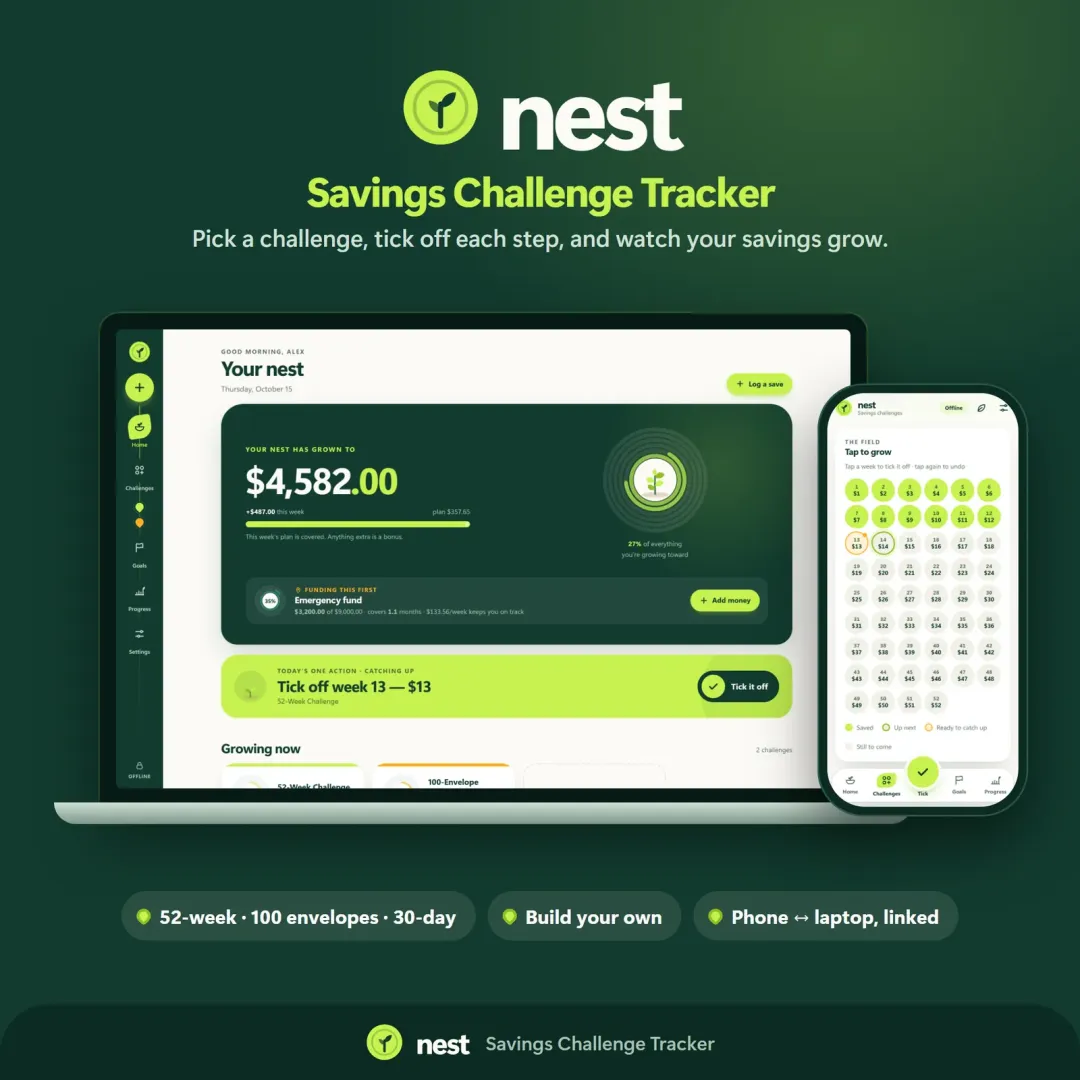
Nest savings challenge tracker with growth rings and a savings garden Live

Nest

Savings Challenge Tracker

Run a 52-week, 365-day, no-spend or custom savings challenge and watch your savings grow — with goals, an emergency fund tracker and kind catch-up options.

See Zero in action

The live demo runs in your browser with realistic sample data. Nothing to install, nothing to sign up for.

We use optional cookies for anonymous analytics. Nothing optional is set until you choose. Cookie policy