VaultlyApps
Live Web app (installable PWA)

Till

Small Business Profit Planner

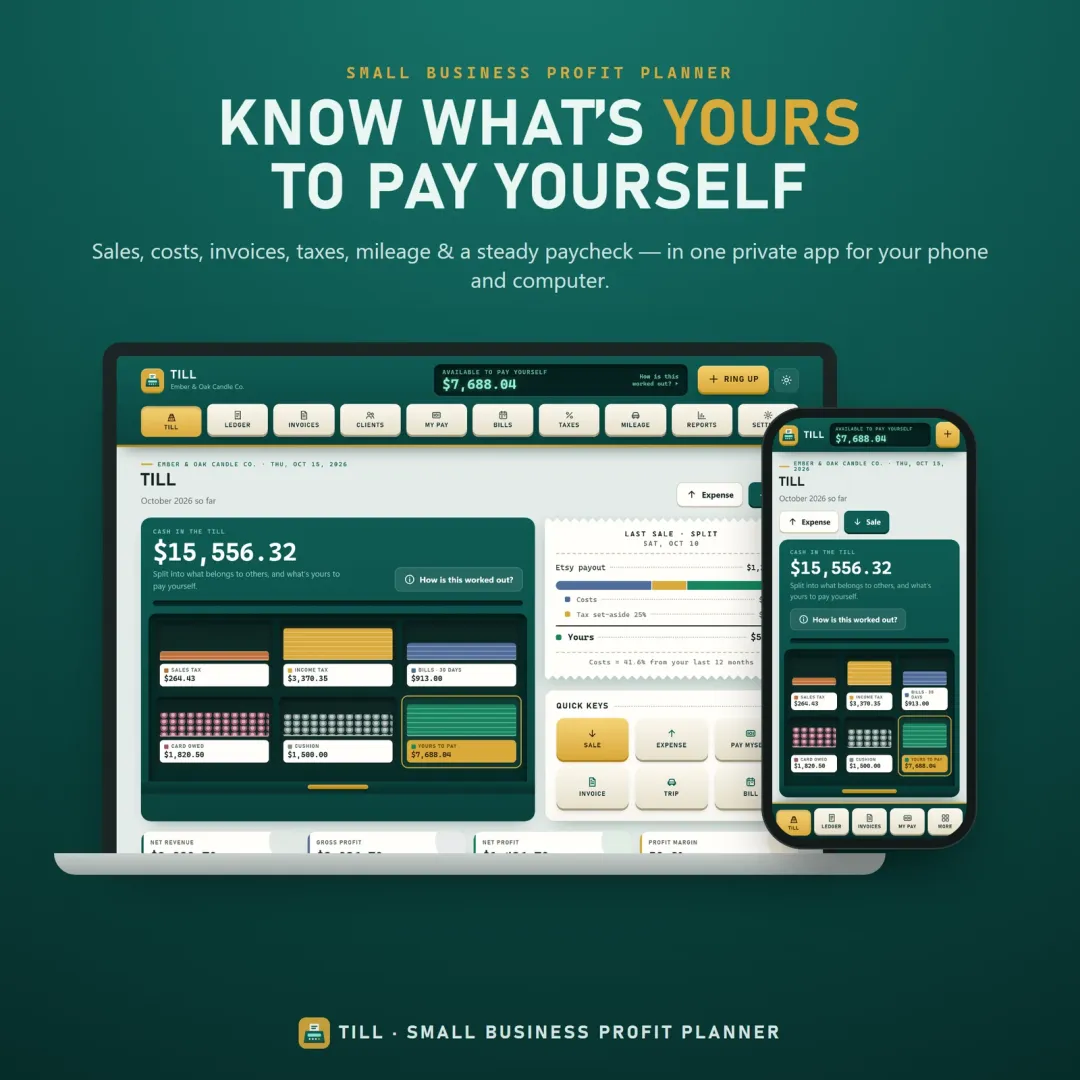
A small business planner and profit tracker for freelancers, makers and Etsy sellers — see what's really yours to pay yourself, send invoices, set tax aside and log mileage.

Try the live demo to explore the application — it runs right here on VaultlyApps with sample data, no sign-up needed.

Till small business planner app with the cash drawer showing what is available to pay yourself

What is Till?

Till is a small business planner and profit tracker. It records income and expenses, sends invoices, keeps sales tax and income tax set aside, logs mileage and tracks bills, then shows how much of the cash in your business accounts is really available to pay yourself. It is a planning and record-keeping tool — it does not connect to your bank or move money.

What problem does Till solve?

When income comes in unevenly, the balance in a business account looks bigger than it is — part of it belongs to the tax office, to suppliers, to upcoming bills and to the card. Small business owners end up guessing what they can safely pay themselves. Till separates that money so the owner's share is visible.

Key features

  • The cash drawer

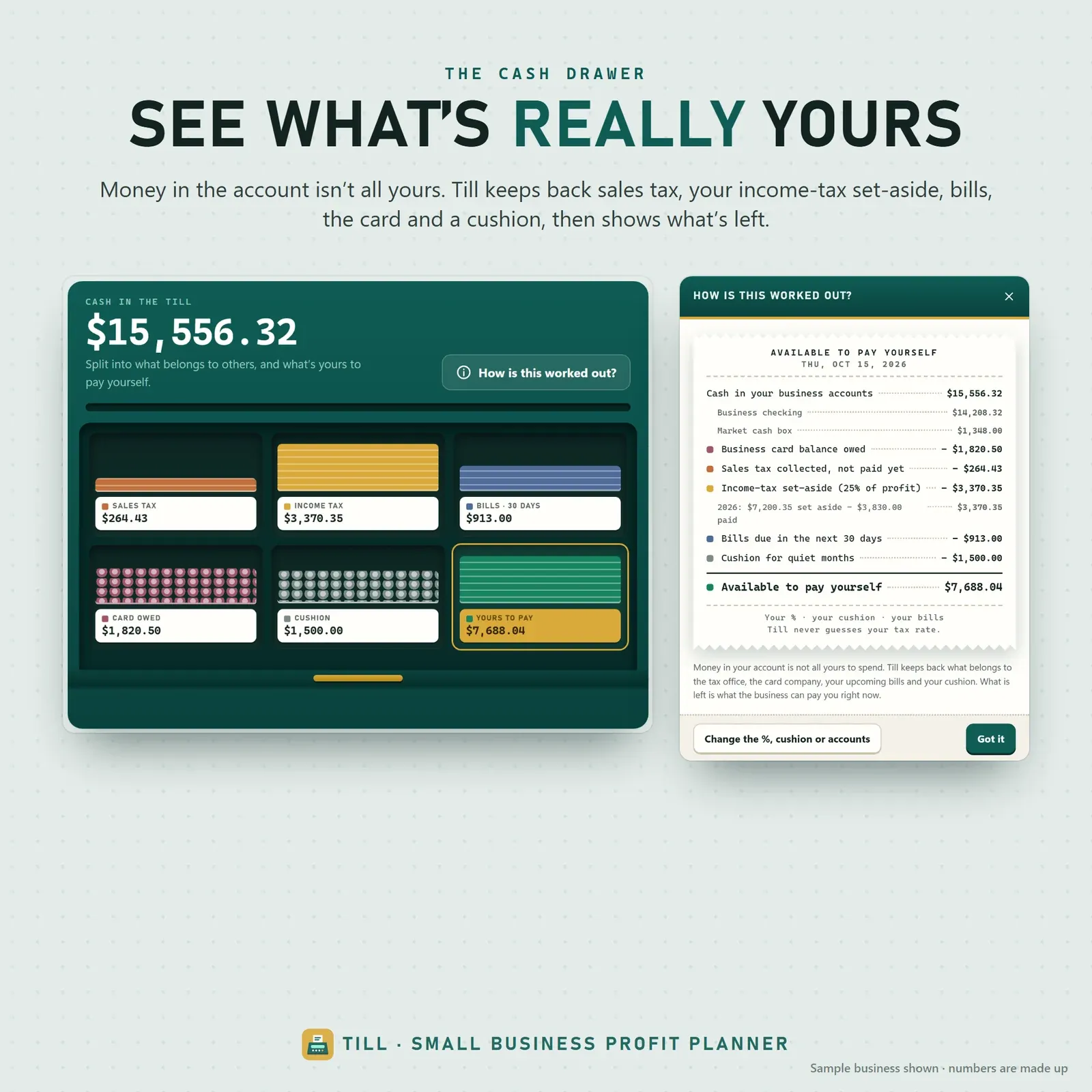
    Business cash split into bins — sales tax collected, income-tax set-aside, bills due in 30 days, the card balance, your cushion — and what is left for you, with every line of the calculation one tap away.

  • Income and expense log

    Eleven entry types from sales and refunds to owner draws, loans and tax payments; amounts are always positive and the type decides the direction, so there are no wrong-sign mistakes.

  • Invoice tracker

    Line items, discounts, tax, payment terms and automatic numbers; printable invoices, part payments and copy-ready reminders for overdue clients.

  • Pay yourself

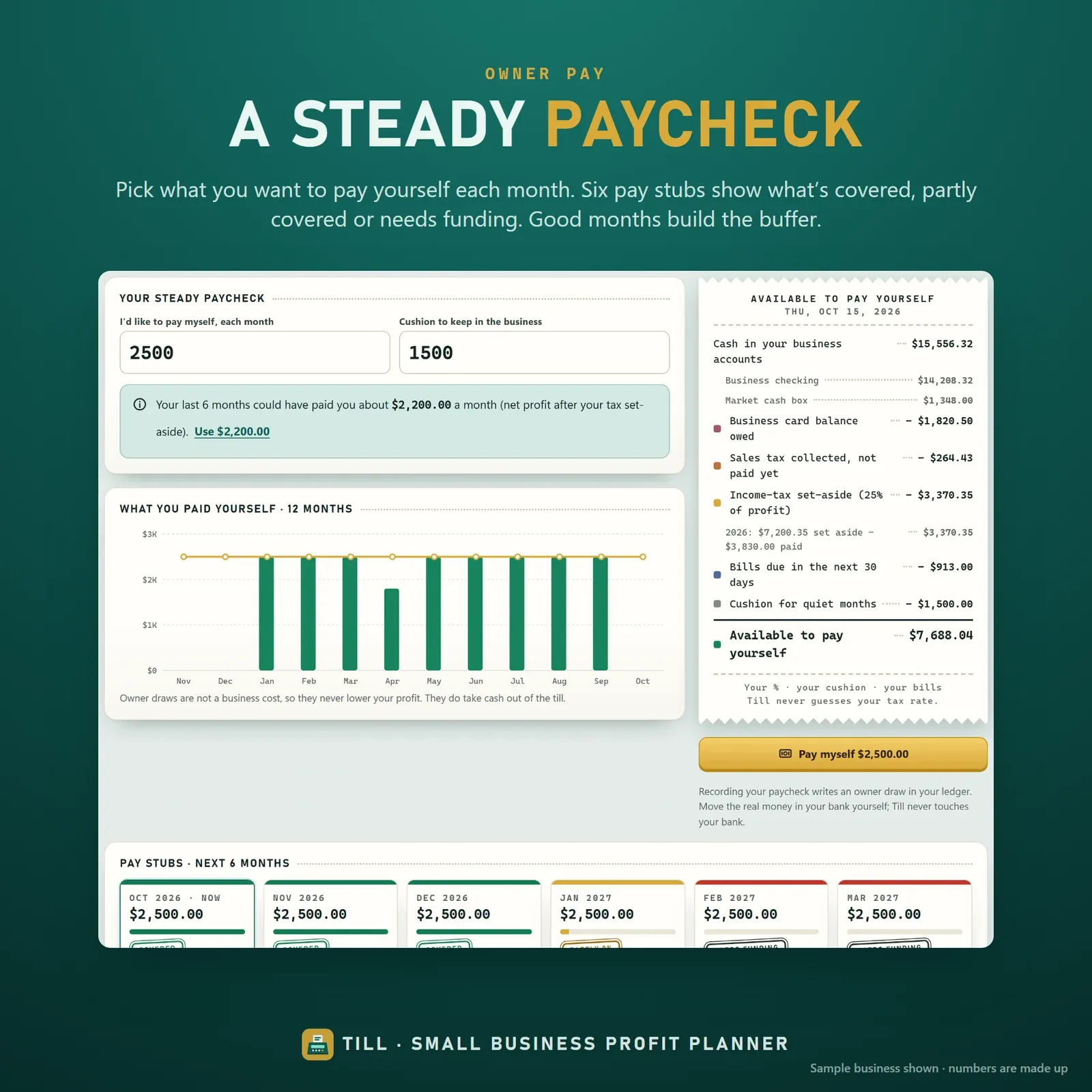
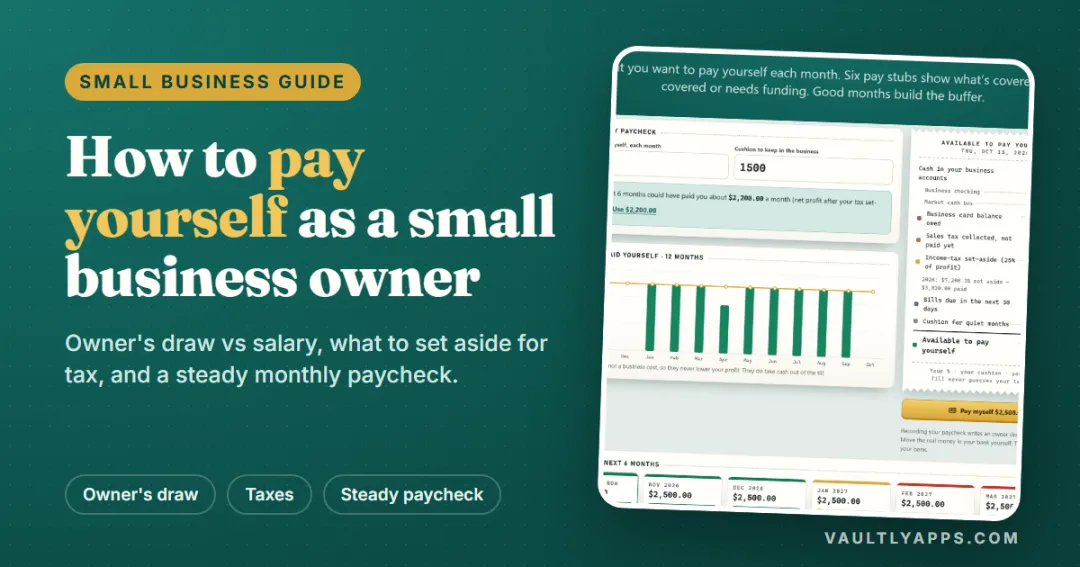
    Choose a monthly paycheck and a cushion; six pay stubs show which months are covered so good months can fund quiet ones.

  • Tax set-aside

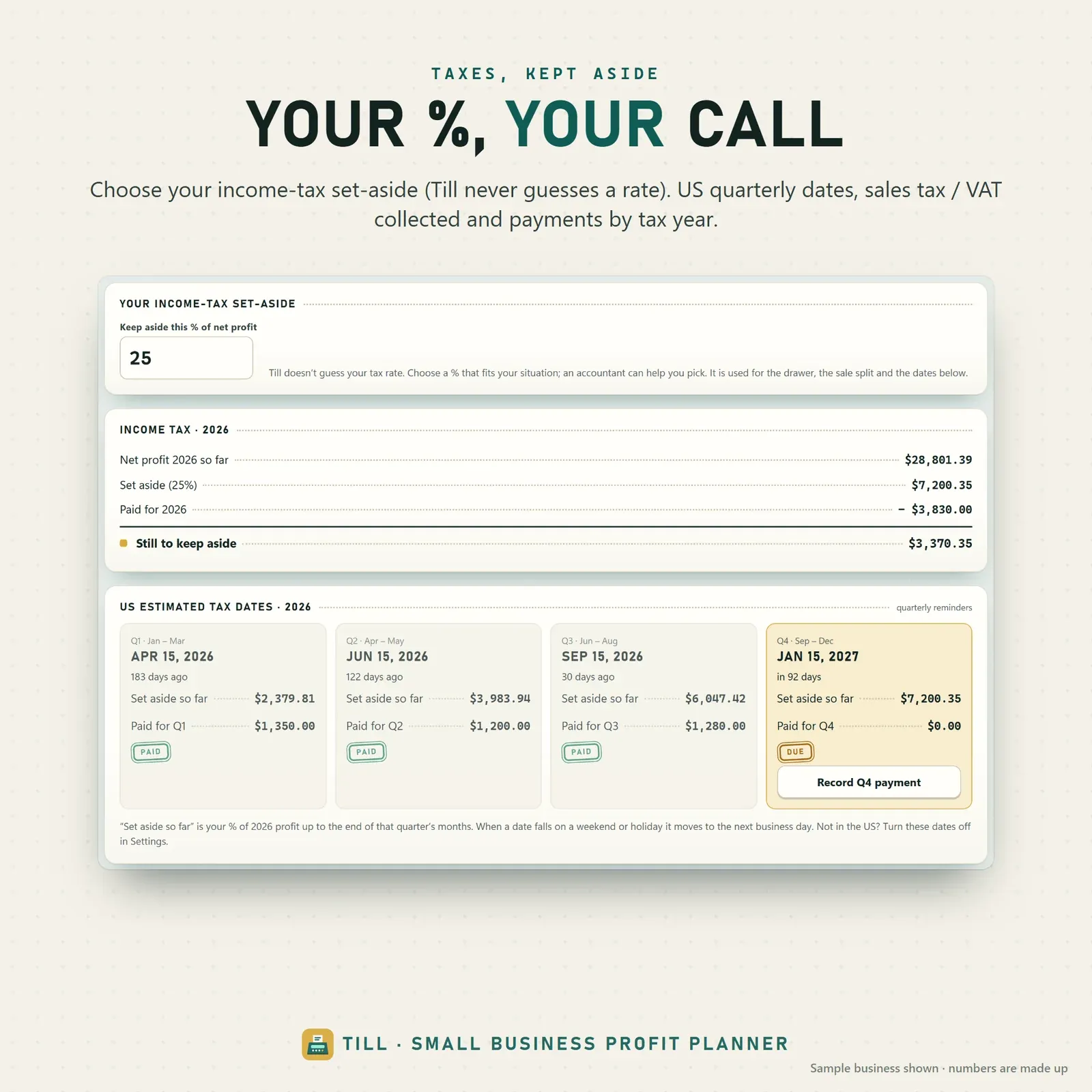
    Your own income-tax percentage (never guessed), US quarterly estimated tax dates and sales tax, VAT or GST collected and still held.

  • Mileage tracker

    Trips with purpose, round trips and clients, a yearly total and a deduction estimate at the rate you confirm.

  • Reports

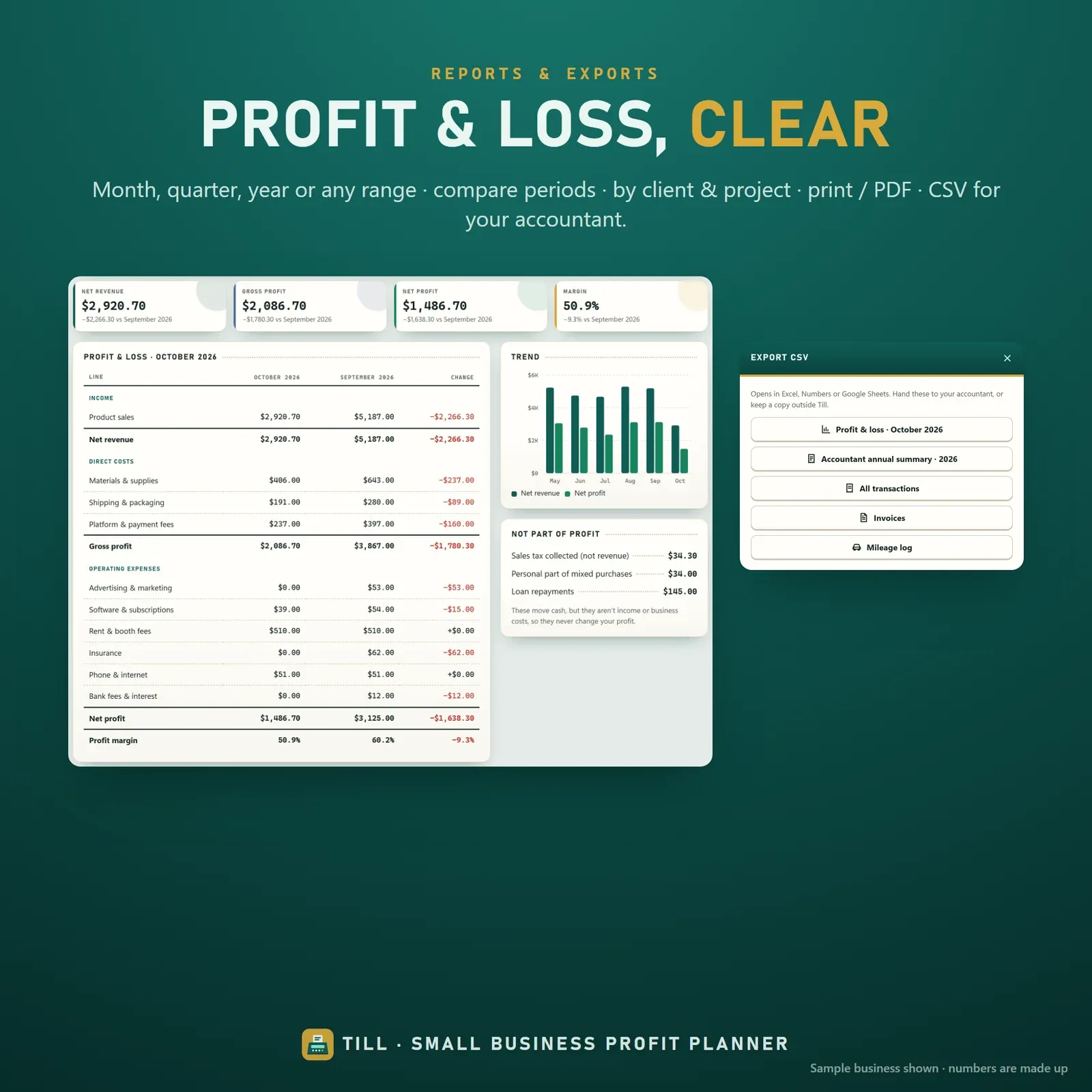
    Profit and loss for any period compared with the one before, profit by client and project, clean printouts and CSV exports for your accountant.

  • Linked devices

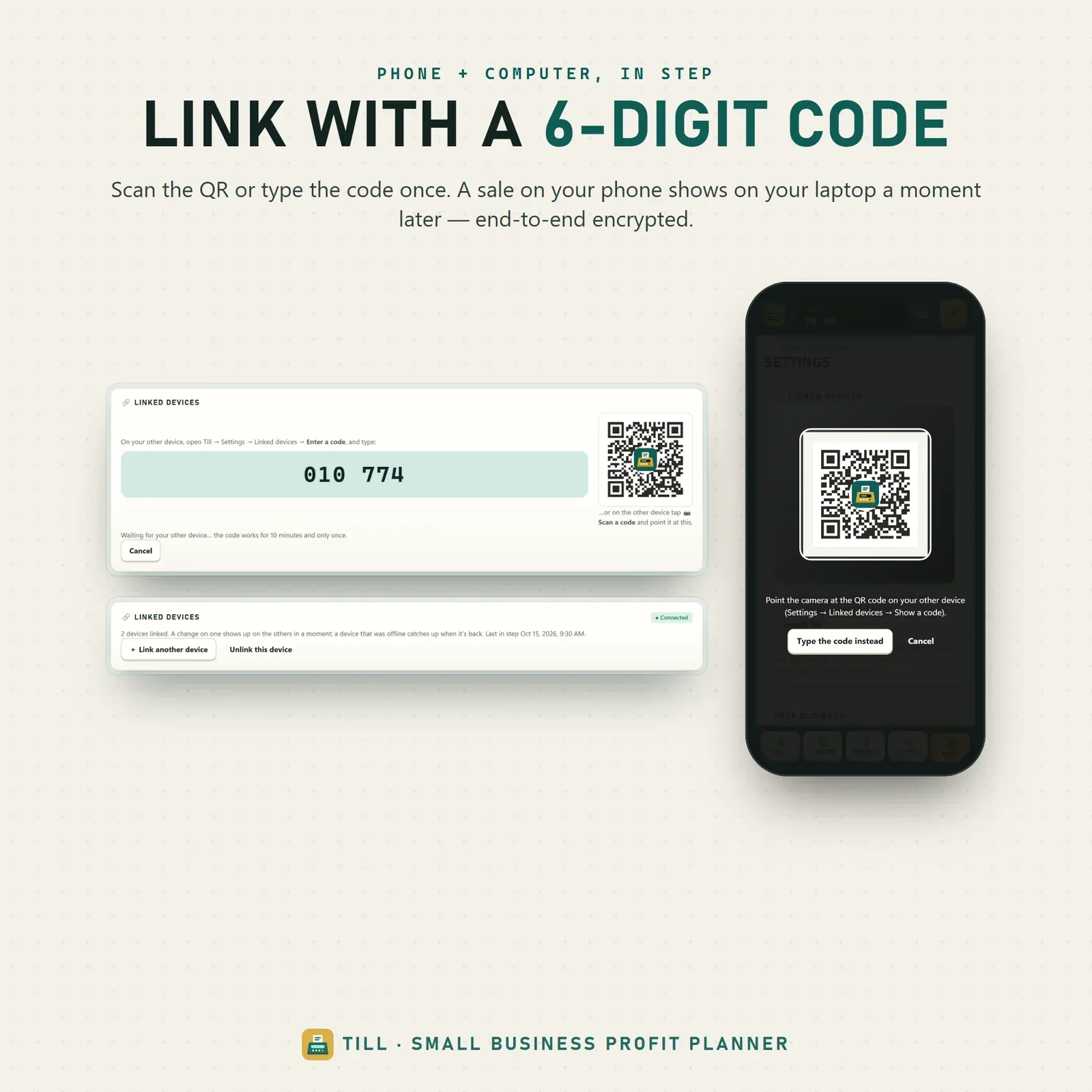
    Ring up a sale on your phone and see it on your laptop a moment later — linked once with a 6-digit code or QR, encrypted on the device.

Screenshots

  • The cash drawer splits business cash into sales tax, income-tax set-aside, bills, card and what is yours

    The cash drawer splits business cash into sales tax, income-tax set-aside, bills, card and what is yours

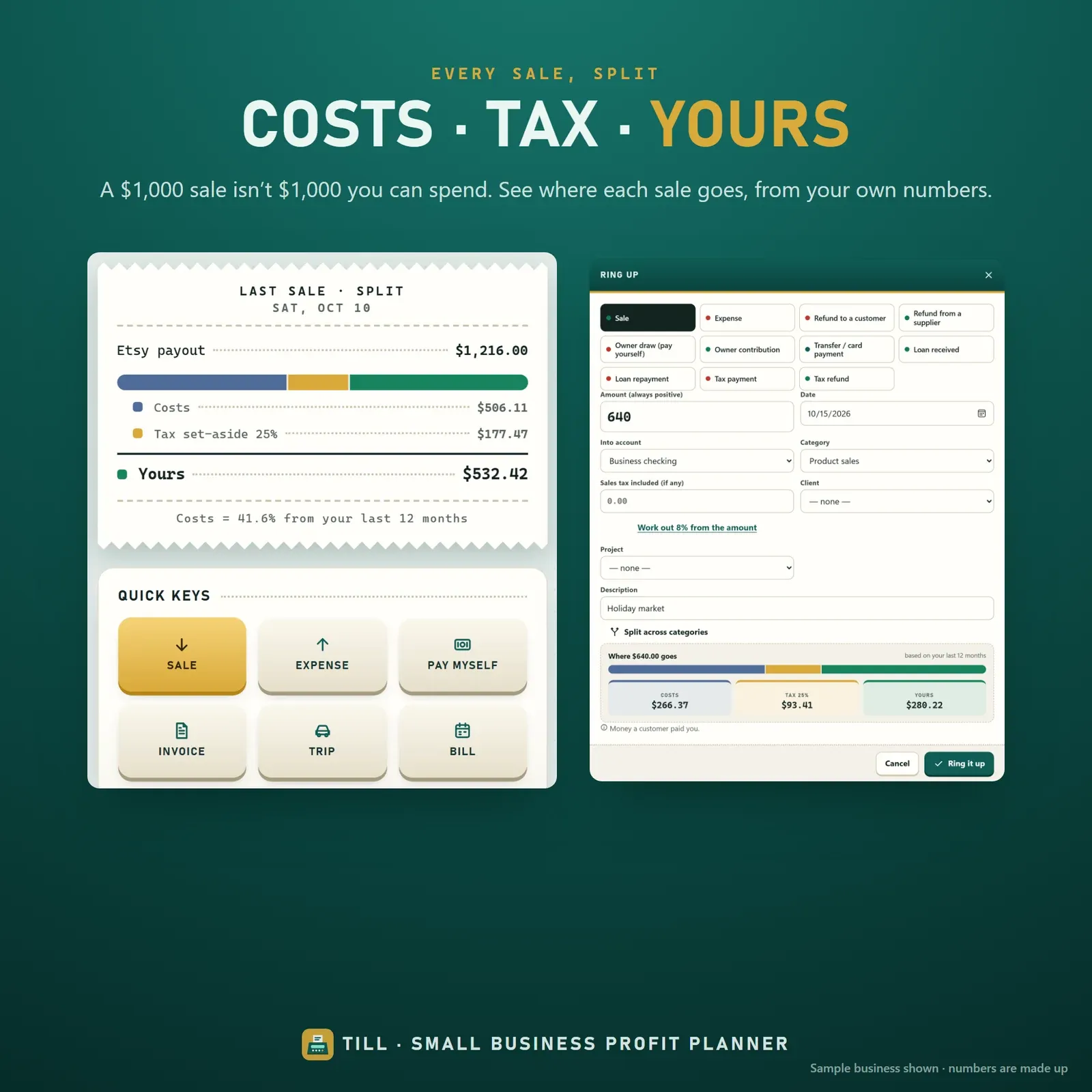
  • Every sale split into costs, tax and your share

    Every sale split into costs, tax and your share

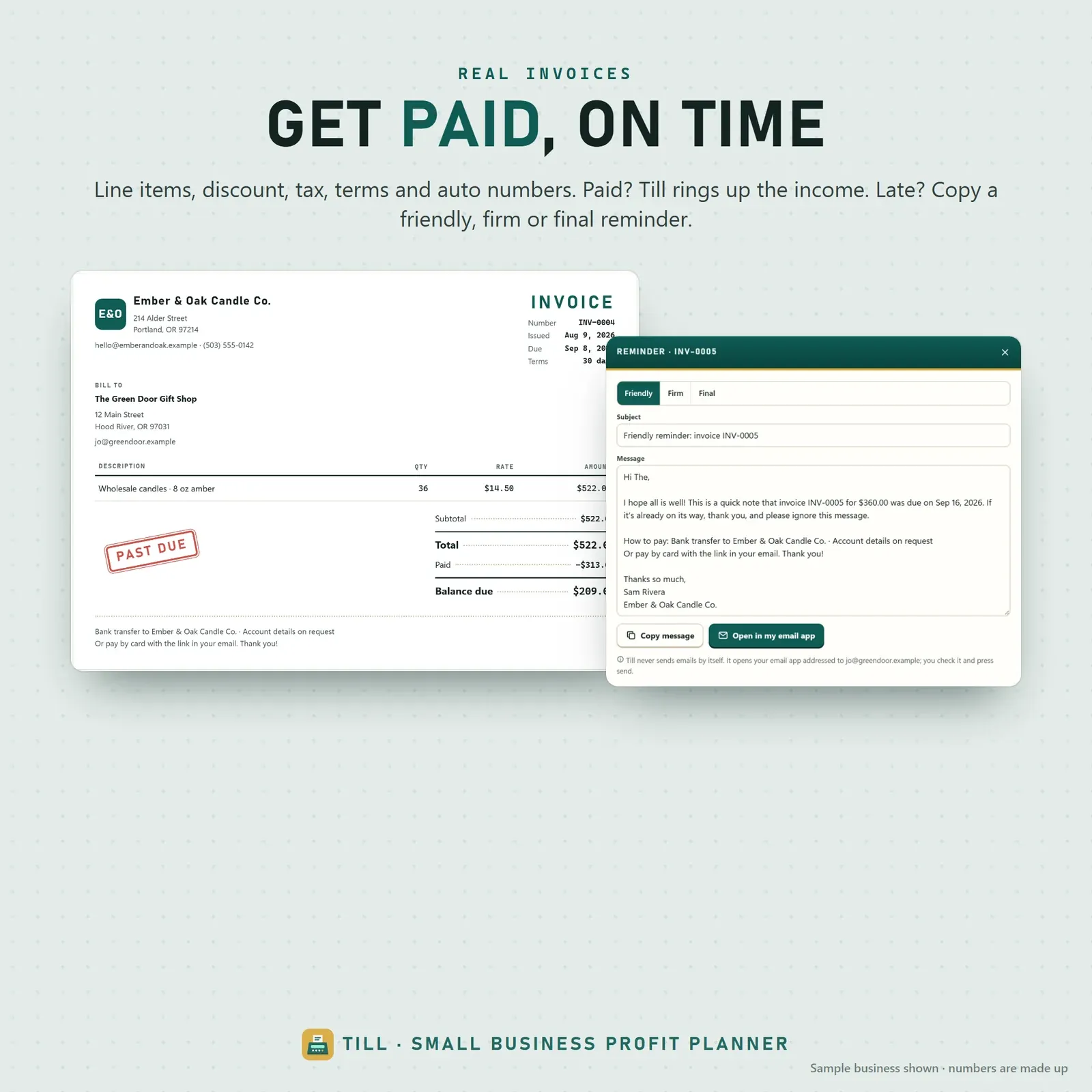
  • Invoices with line items, payment terms and paid, sent and overdue stamps

    Invoices with line items, payment terms and paid, sent and overdue stamps

  • Owner pay planner with six monthly pay stubs

    Owner pay planner with six monthly pay stubs

  • Tax set-aside and US quarterly estimated tax dates

    Tax set-aside and US quarterly estimated tax dates

  • Profit and loss report with profit by client and project

    Profit and loss report with profit by client and project

  • Phone and laptop linked with a 6-digit code or QR

    Phone and laptop linked with a 6-digit code or QR

How does Till work?

  1. 1

    Try the live demo with the sample business, Ember & Oak Candle Co.

  2. 2

    After buying, open Till from your private link and install it on your phone or computer.

  3. 3

    Enter your starting balances and choose your tax percentage.

  4. 4

    Ring up sales and costs as they happen and check what is available to pay yourself.

Who is Till for?

  • Freelancers and self-employed service providers
  • Makers and Etsy sellers
  • Market and craft-fair sellers
  • Sole traders whose income changes month to month

What is really yours

Till's signature screen is the cash drawer. The cash in your business accounts is split into bins — sales tax you collected, the income tax you're setting aside, bills due in the next 30 days, the business card balance and your cushion — and whatever is left is available to pay yourself. Tap "How is this worked out?" to see every line.

It's the business version of a safe-to-spend number. If that idea is new, our guide What is a safe-to-spend number? explains it with worked examples, including irregular income.

Built like a shop till

Every sale is rung up like a receipt and shows its split: costs, tax and your share, based on your own numbers. Invoices get rubber-stamp statuses, and the owner pay planner prints six pay stubs so you can see which months are covered before you pay yourself. Three themes — Counter, Night shift and Thermal paper — keep the shop-till feel.

Income and expenses without the jargon

Till records eleven entry types: sale, expense, refund to a customer, refund from a supplier, owner draw, owner contribution, transfer or card payment, loan received, loan repayment, tax payment and tax refund. You always type a positive amount; the type decides whether money comes in, goes out or just moves, so there are no wrong-sign mistakes.

You can split one payment across several categories, record only the business share of a mixed purchase, and keep income, direct costs (materials, shipping, platform fees) and operating expenses apart — so net revenue, gross profit, net profit and margin are always clear. A searchable ledger filters by month, account and type, and CSV import brings in bank or marketplace history with a preview and undo.

Invoices and clients

Create invoices with clients, line items (quantity × rate), discount, tax, payment terms and automatic invoice numbers, with your business name and address on a printable page. Statuses run draft, sent, partly paid, paid and overdue. Record a full or part payment and Till rings up the income for you. For overdue invoices, copy a friendly, firm or final reminder or open it in your email app — Till never sends anything by itself.

Clients and projects show profit for each, so you can see which work is really worth it.

Pay yourself a steady paycheck

Choose the paycheck you'd like each month and a cushion to keep in the business. Six pay stubs show which months are covered, partly covered or still need funding — good months build a buffer for quiet ones. After three months of records, Till shows what your recent months could have paid you. "Pay myself" records an owner draw; you move the real money in your bank. New to owner's draws? Read how to pay yourself as a small business owner.

Tax, mileage, bills and reports

  • Tax set-aside at the percentage you choose — Till never guesses your tax rate — with US quarterly estimated tax dates (which can be turned off outside the US).
  • Sales tax, VAT or GST collected, paid and still held, and tax payments tagged with the tax year they were for.
  • Mileage log with date, from and to, purpose, round trips and client, a yearly total and a deduction estimate at the rate you confirm.
  • Recurring bills with overdue flags; tap Paid to record the expense.
  • Monthly budget per category plus an income target.
  • Reports for any month, quarter, year or date range, compared with the period before or a year earlier: profit and loss, profit by client and project, a trend chart, clean printouts and CSV exports for your accountant.

Who Till is for

Freelancers, makers, Etsy sellers, market and craft-fair sellers, self-employed service providers and sole traders — anyone whose income changes month to month and who wants clearer business finances without building a spreadsheet. It's built for one owner running one small business.

Comparing tools? Our checklist for choosing business software includes Till as an example and a scorecard you can use for any option.

A typical week with Till

  1. When you make a sale: ring it up on your phone — at the market, the studio or the desk.
  2. When you buy supplies: record the expense, or let the weekly CSV import catch it.
  3. When an invoice is paid: record the payment; the income is added automatically.
  4. Friday: check the cash drawer and the pay stubs, then decide whether to pay yourself this week.
  5. Quarter-end: check the tax set-aside against the quarterly dates and print the P&L.

Privacy and devices

Till has no account and no bank connection. Your records stay on your own devices. Link your phone and laptop once with a 6-digit code or QR, and a sale rung up on your phone appears on your laptop a moment later — encrypted on the device before it travels. A device that was offline catches up when it reconnects. Backup and restore take one file.

Till installs from your private link on iPhone, iPad, Android, Mac, Windows and Chromebook and works offline once installed. Any currency symbol works, sales tax can be renamed VAT or GST, and distances can be miles or km.

What you get

  • Your private Till link and QR code.
  • A 13-page PDF guide: Start Here, How to Open & Install, How Till Works and the license.
  • Bonus printables: 7 business worksheets, 6 goal boards to colour in, and 3 phone plus 2 desktop wallpapers.
  • Free updates for the app itself.

Getting started

  1. Open your private link from the Start Here page and install Till.
  2. Explore the sample business, Ember & Oak Candle Co., with the guided tour.
  3. Clear the samples, enter your starting balances and choose your tax percentage.
  4. Ring up your first sale and pick your paycheck.

Landlords can use RentRoll for rental properties alongside Till. For personal money — the household side of a small business owner's life — see Vault or Flow.

Good to know

Till is a planning and record-keeping tool, not tax, legal or financial advice. Records stay on your own devices; it needs internet the first time you open it on each device and works offline after that.

Till FAQ

Does Till connect to my bank?

No. You add records yourself or import a CSV file from your bank or marketplace. Till never moves money.

Does Till calculate my taxes?

Till sets aside the percentage you choose and shows US quarterly due dates. It is not tax advice — your accountant or tax office confirms the real amounts.

Can I send invoices from Till?

Till makes printable invoices and copy-ready reminders. You send them from your own email app; Till never sends anything by itself.

Does it work outside the US?

Yes. Any currency symbol, sales tax can be renamed VAT or GST, miles or km, and the US quarterly dates can be turned off.

Is there a subscription?

No. Till is a one-time purchase with free updates and no account.

Can Till import transactions from my bank or marketplace?

Yes. Import a CSV file, match its columns, choose the date and decimal format and preview before anything is added. Possible duplicates start unticked, and an import can be undone.

How does Till handle a business credit card?

A purchase on the card is recorded as the expense; paying the card is a transfer. That way the cost is never counted twice, and the drawer shows the card balance you still owe.

Can I use Till for a mixed personal and business purchase?

Yes. Record the purchase and the business percentage, and only the business share counts as an expense.

Further reading

Related articles

All articles
What Is a Safe-to-Spend Number (and How Do You Calculate It)?

Personal Finance

What Is a Safe-to-Spend Number (and How Do You Calculate It)?

Your bank balance isn't what you can spend. A safe-to-spend number subtracts bills, savings and planned spending first — here's the formula, worked examples for monthly, weekly and irregular pay, and the mistakes to avoid.

11 min read
How to Track Subscriptions and Stop Paying for Ones You Forgot

Personal Finance

How to Track Subscriptions and Stop Paying for Ones You Forgot

Subscriptions are designed to be forgotten. A simple four-step audit — find, convert to yearly cost, decide, and set reminders — puts every recurring charge back under your control. Includes a worked audit and a cancellation checklist.

10 min read

More from VaultlyApps

Related projects

All projects
Vault personal finance dashboard shown on a laptop and a phone, with the safe-to-spend number and cash-flow charts Live

Vault

Personal Finance Dashboard

Your whole money picture on one private dashboard — safe-to-spend, budgets, bills, goals, debt payoff and net worth, on your phone and laptop.

Flow ADHD budget planner showing a calm Safe to Spend screen Live

Flow

ADHD Budget Planner

A calm budget planner designed for ADHD brains — one Safe to Spend number, 3-tap logging, focus mode and kind overspend fixes instead of red warnings.

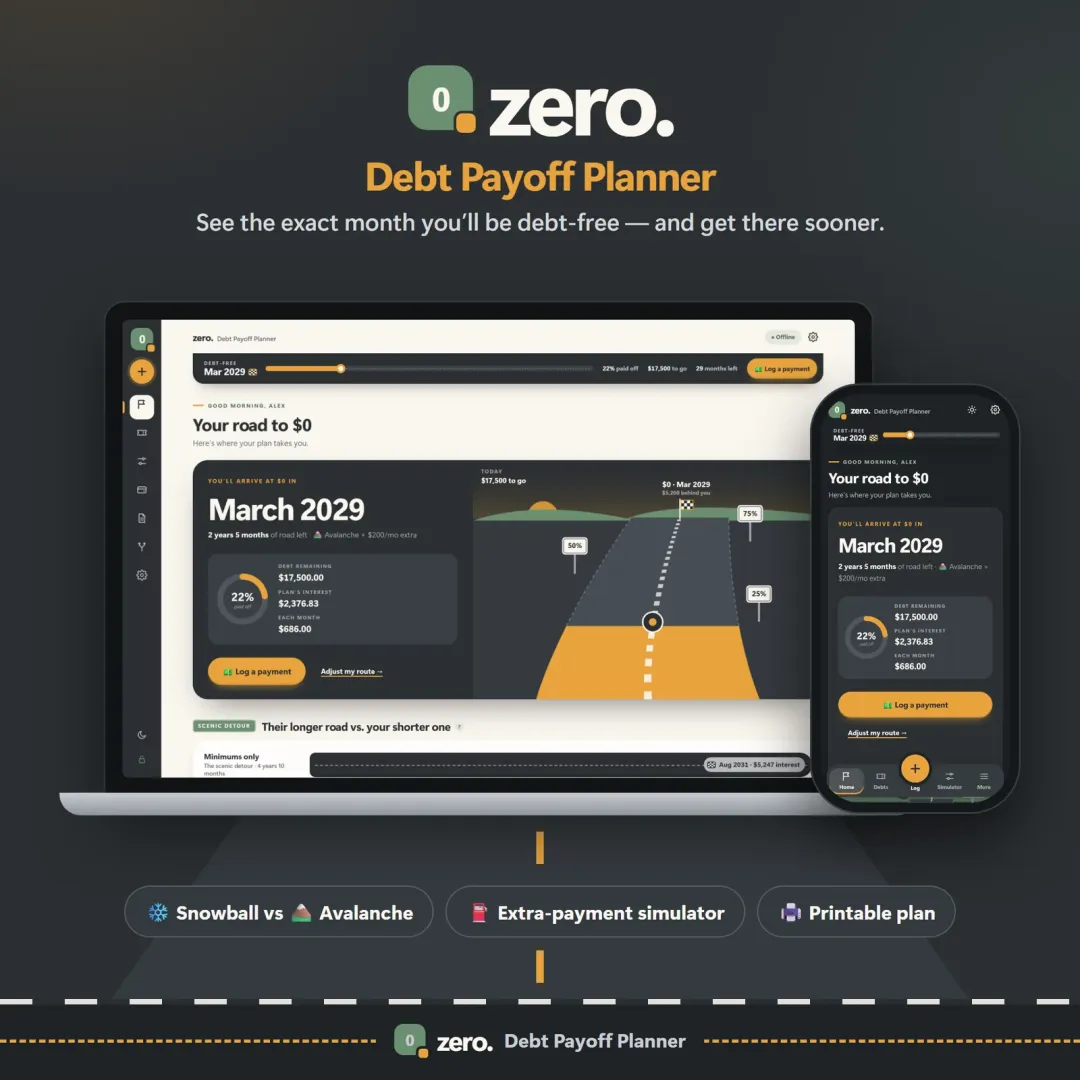
Zero debt payoff planner with a road leading to a $0 finish flag and the projected debt-free date Live

Zero

Debt Payoff Planner

See your debt-free date, compare the snowball and avalanche methods side by side, and watch extra payments pull the finish line closer.

See Till in action

The live demo runs in your browser with realistic sample data. Nothing to install, nothing to sign up for.

We use optional cookies for anonymous analytics. Nothing optional is set until you choose. Cookie policy