VaultlyApps
Live Web app (installable PWA)

RentRoll

Landlord Dashboard

A private rent roll and property manager for landlords with 1 to 20 units — rent collection, late fees, leases, maintenance and Schedule E tax reports.

Try the live demo to explore the application — it runs right here on VaultlyApps with sample data, no sign-up needed.

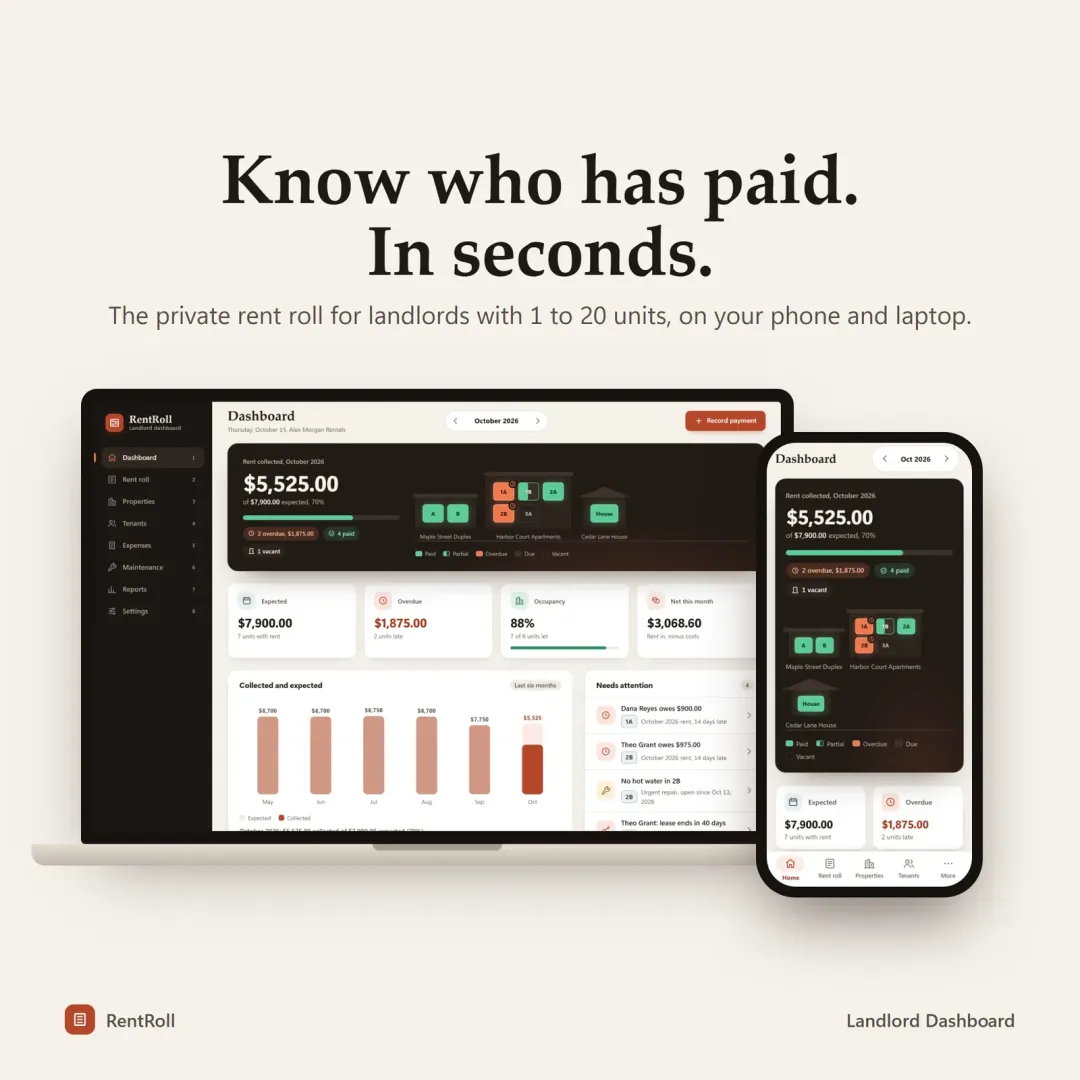
RentRoll landlord dashboard with buildings whose windows light up when rent is paid

What is RentRoll?

RentRoll is a landlord dashboard and rent tracker for small landlords. It keeps properties, units, tenants, rent payments, late fees, leases, expenses and maintenance in one private app, and produces profit-and-loss and Schedule E tax reports. It records rent you receive; it does not collect rent online or connect to a bank.

What problem does RentRoll solve?

Small landlords often track rent across texts, spreadsheets and memory, which makes it hard to see who has paid, what is overdue and what the rentals actually earned at tax time. RentRoll gives each unit one row and turns the records into reports a tax preparer can use.

Key features

  • Rent roll

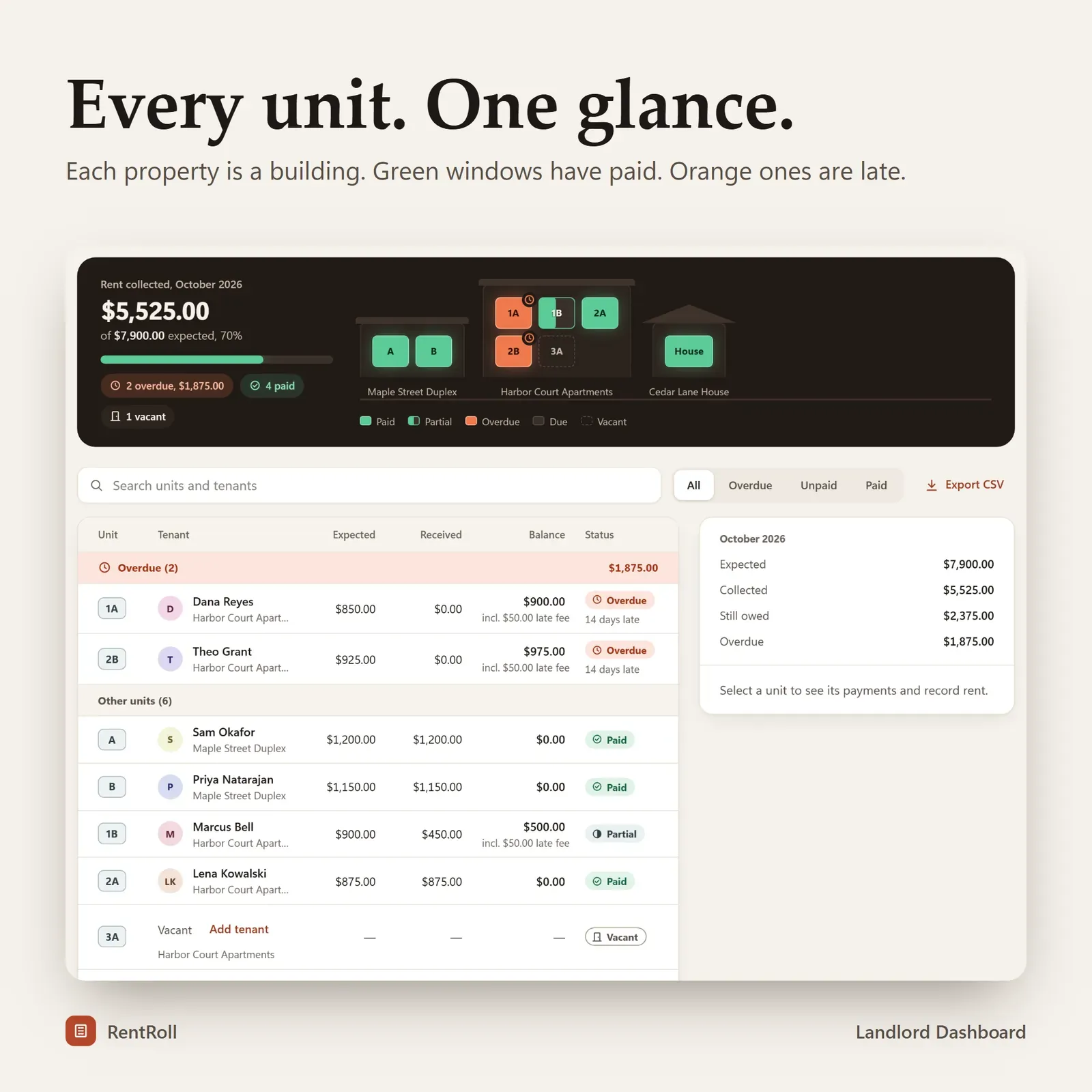
    One row per unit — tenant, expected, received, balance and status (paid, partial, late or vacant).

  • 3-tap payments

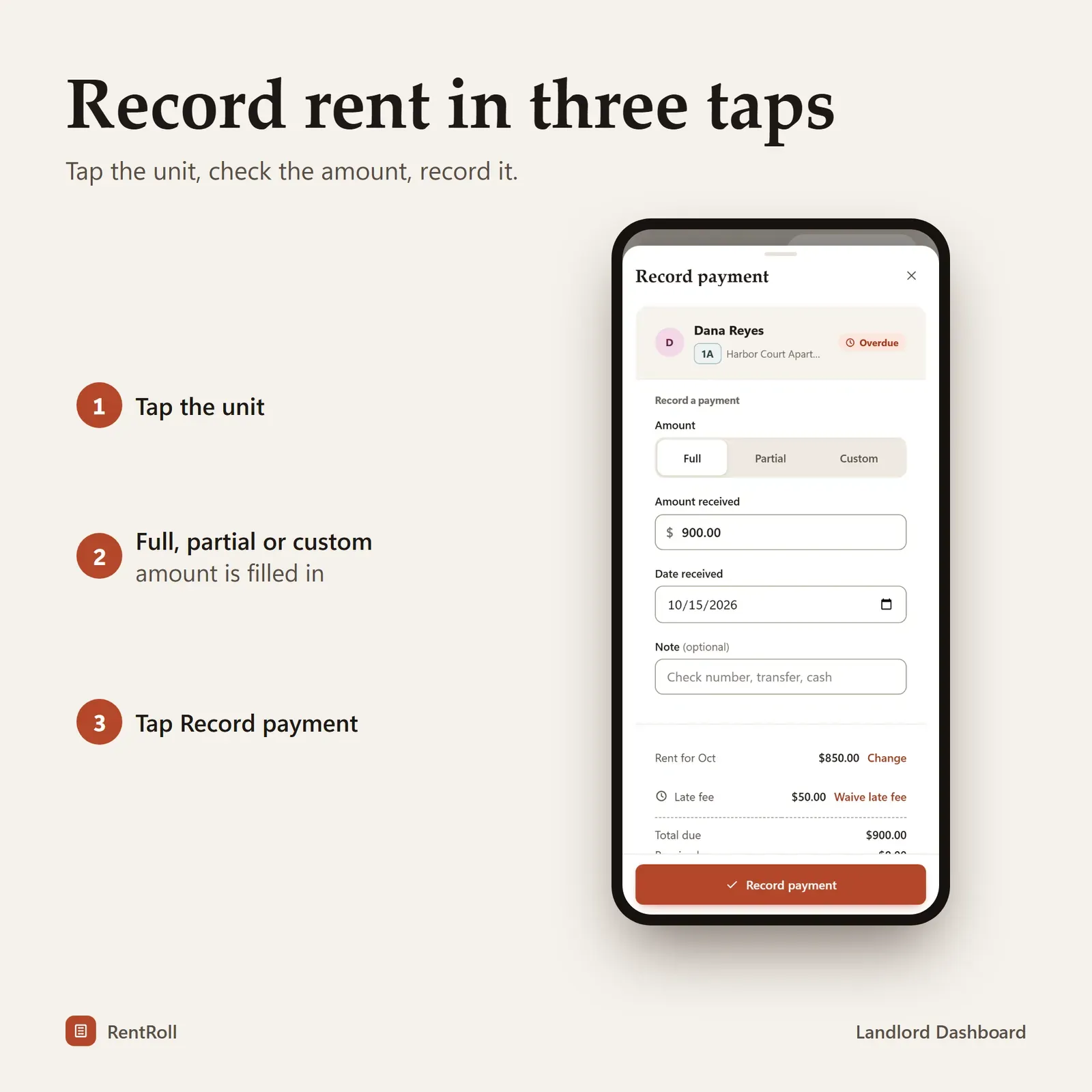
    Record full, partial or custom payments, including several payments in one month.

  • Automatic late fees

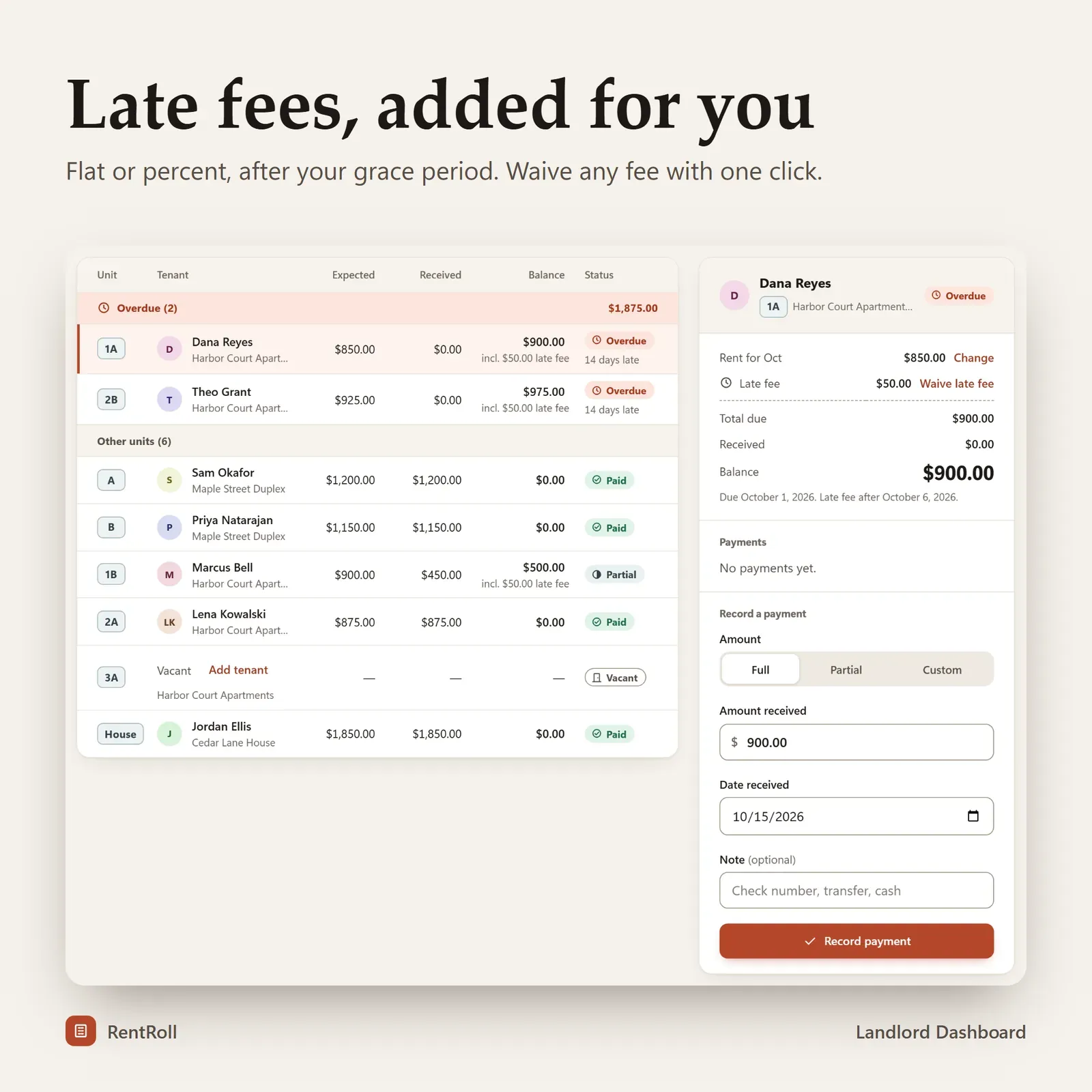
    Flat or percentage fees after the grace period you set — assessed once, and waivable with one click.

  • Leases and tenants

    Tenant directory with contacts, deposits and lease dates, countdowns that turn amber at 60 days, and a move-out flow with deposit returns.

  • Expenses and maintenance

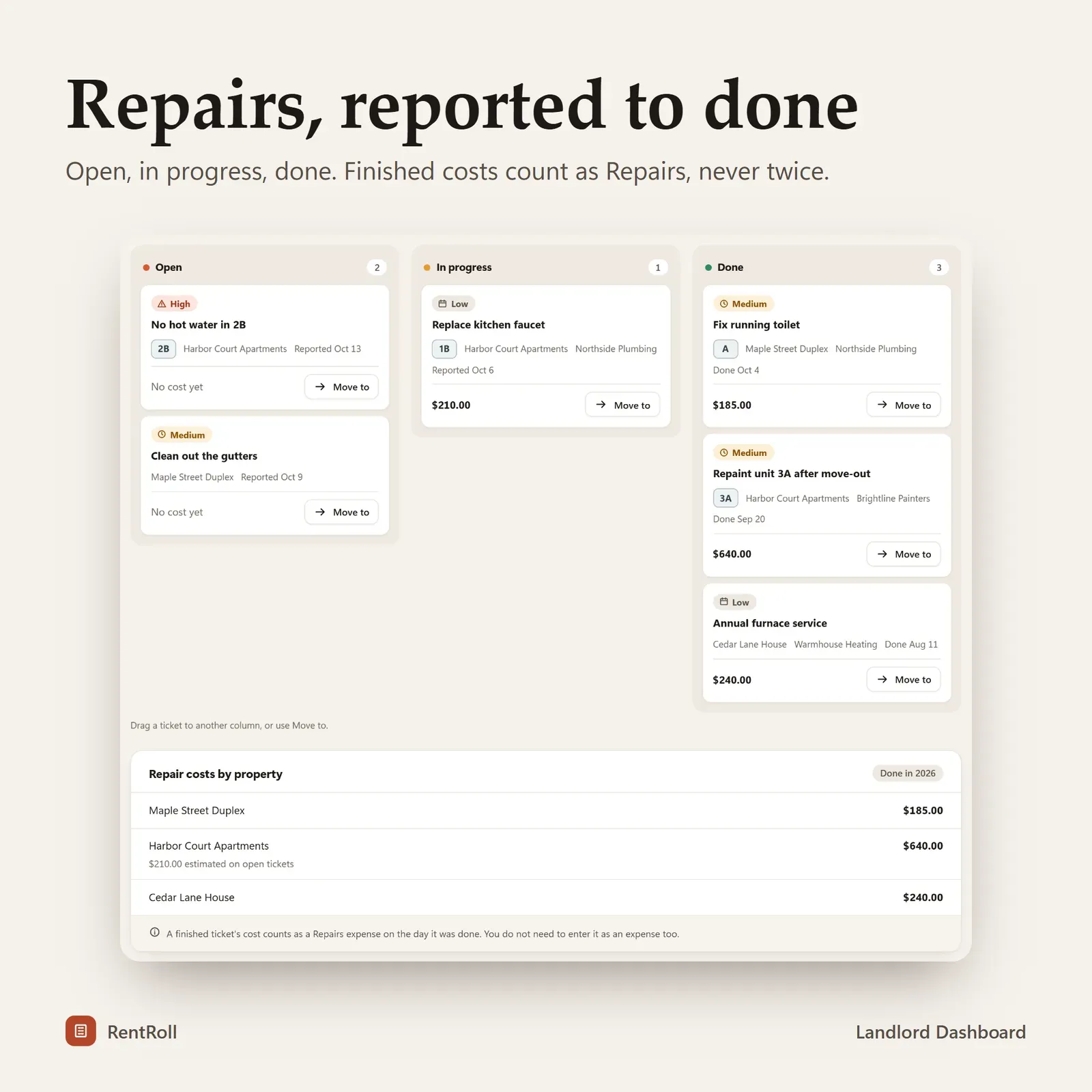
    Expenses in Schedule E categories, monthly repeating bills, CSV import, and a maintenance board with priority, cost and vendor.

  • Tax-time reports

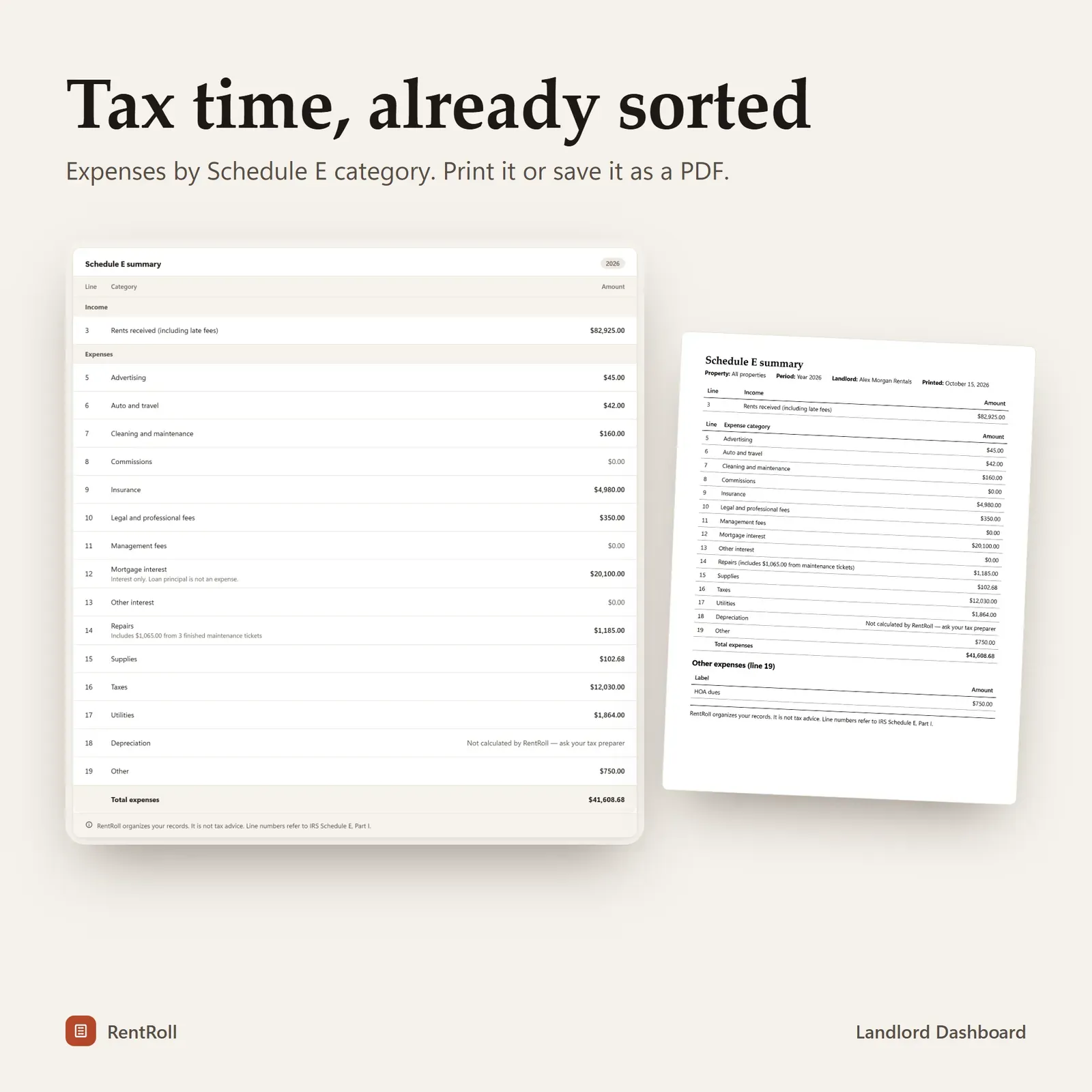
    Schedule E summary with IRS line numbers, profit and loss per property, and CSV export of the rent ledger, expenses and tenants.

  • Needs attention

    Late rent, leases ending soon and urgent repairs collected in one list.

  • Linked devices

    Record rent on your phone at the door and see it on your laptop a moment later. Encrypted, up to 4 devices.

Screenshots

  • Rent roll with one row per unit showing tenant, expected, received, balance and status

    Rent roll with one row per unit showing tenant, expected, received, balance and status

  • Recording a full or partial rent payment

    Recording a full or partial rent payment

  • Automatic late fees after a grace period

    Automatic late fees after a grace period

  • Schedule E tax summary with IRS line numbers

    Schedule E tax summary with IRS line numbers

  • Maintenance board with open, in progress and done repairs

    Maintenance board with open, in progress and done repairs

How does RentRoll work?

  1. 1

    Explore the live demo — it includes 3 sample properties and 8 units.

  2. 2

    After buying, install RentRoll from your private link.

  3. 3

    Add your properties, units and tenants.

  4. 4

    Record rent as it arrives and print reports at tax time.

Who is RentRoll for?

  • Independent landlords with 1 to 20 units
  • Accidental landlords renting out a former home
  • Small property owners moving off spreadsheets
  • Landlords who prepare a US Schedule E each year

Every unit at a glance

RentRoll draws each property as a building and each unit as a window. When rent is paid, the window lights up; overdue units stand out in orange. Underneath, the collection dashboard shows rent expected, collected and overdue, occupancy and net income for the month, plus a collected-vs-expected chart and your collection rate.

A "Needs attention" list brings together late rent, leases ending soon and urgent repairs, so the first screen tells you what to do today.

The rent roll

The rent roll is one row per unit: tenant, expected rent, received, balance and status — paid, partial, late or vacant. Recording a payment takes three taps: full, partial or a custom amount, with several payments per month if a tenant pays in instalments.

Late fees can be a flat amount or a percentage of rent, applied automatically after the grace period you set. Each fee is assessed once and never rewritten behind your back, and you can waive any fee with one click.

Tenants and leases

Tenants, contact details, deposits and lease dates live in one directory. Lease countdowns turn amber at 60 days, giving you time to renew, re-let or raise the rent. A move-out flow handles deposit returns and deductions so the record is complete when a tenant leaves.

Expenses and maintenance

Rental expenses are categorized using real Schedule E categories from the start, with per-property totals. Monthly repeating bills are added automatically, and you can import expenses from a CSV file.

The maintenance log is a board — Open, In progress, Done — with priority, cost and vendor for each job. When a repair is finished, its cost counts toward your expenses automatically, so nothing is entered twice.

Records that are ready for tax time

At the end of the year you can print a profit-and-loss report per property (by month or year to date), a rent roll and a Schedule E summary with the IRS line numbers — or export the rent ledger, expenses and tenants as CSV for your preparer. For landlords outside the US there's an annual expense summary by category.

RentRoll organizes your records; it isn't tax or legal advice. Your preparer still makes the final decisions.

Who RentRoll is for

RentRoll is designed for small landlords with roughly 1 to 20 units — a duplex, a few single-family rentals, a small building — who have outgrown a spreadsheet but don't need an enterprise property-management platform with tenant portals and online payments. It's also useful for accidental landlords renting out one former home, and for anyone who manages a few units for family.

Choosing software for a small rental business? Our checklist for choosing business software uses RentRoll as a worked example of fit over features.

A typical month with RentRoll

  1. The 1st: the rent roll shows every unit as due. As payments arrive, record them — full or partial — and the windows light up.
  2. After the grace period: late fees are applied automatically to unpaid units; waive any that don't make sense.
  3. During the month: add repairs to the maintenance board and move them to Done when finished.
  4. Month-end: check net income per property and the collection rate.
  5. Year-end: print the Schedule E summary and P&L, or export CSVs for your preparer.

Spreadsheet or RentRoll?

Many small landlords start with a spreadsheet, and it works — until it doesn't. The usual breaking points are partial payments, late fees, a second property and tax time. RentRoll is built for exactly those moments:

Task Typical spreadsheet RentRoll
Partial and multiple payments Extra columns and notes Built in, with the balance owed
Late fees Calculated by hand Automatic after your grace period
Lease end dates Easy to miss Countdowns that turn amber at 60 days
Repairs A separate list Maintenance board feeding expenses
Year-end Re-sorting expenses Schedule E summary with line numbers
Phone at the door Awkward Record rent in three taps

If your spreadsheet already does all of this comfortably, keep it. If it's starting to fight you, the free demo shows the difference in a few minutes.

Privacy and devices

RentRoll has no account and no bank connection. It records rent you receive; it doesn't collect rent online. Tenant details and finances stay on your own devices. Link your phone and laptop once with a 6-digit code or QR, and rent recorded on your phone at the door appears on your laptop a moment later — encrypted on the device before it travels.

RentRoll installs from your private link on iPhone, iPad, Android, Mac, Windows and Chromebook and works offline once installed. It has Brick, Light and Dark themes, supports USD, CAD, GBP, EUR and AUD, and includes keyboard shortcuts and backup and restore.

What you get

  • Your private RentRoll link and QR code.
  • A 21-page PDF guide: Start Here, How to Open & Install, How RentRoll Works and the license.
  • Bonus printables: rent receipts, a move-in / move-out checklist, tenant and property info sheets, a mileage log, 7 landlord worksheets and 5 wallpapers.
  • Free updates for the app itself.

Getting started

  1. Open your private link from the Start Here page and install RentRoll.
  2. Explore the sample portfolio — 3 properties and 8 units — with the guided tour.
  3. Clear the samples and add your first property, its units and tenants.
  4. Record this month's rent; the dashboard does the rest.

Running a small business alongside your rentals? Till tracks income, invoices, tax set-asides and mileage. For household bills and subscriptions, see Pulse.

Good to know

RentRoll is for organizing records. It is not tax or legal advice — always check with your tax preparer. It is licensed for your own rental business.


RentRoll FAQ

Does RentRoll collect rent from tenants?

No. RentRoll records rent you receive by any method. It does not process payments or connect to a bank.

How many units can RentRoll handle?

It is designed for independent landlords with roughly 1 to 20 units.

Does RentRoll support currencies other than US dollars?

Yes — USD, CAD, GBP, EUR and AUD. The Schedule E summary is specific to US taxes; other currencies get an annual expense summary by category.

Is RentRoll tax advice?

No. RentRoll organizes your records and produces summaries. Always check with your tax preparer.

Can several people use the same RentRoll?

The standard license is for your own rental business on up to 4 of your own devices. Contact us about team or multi-user licenses.

How do late fees work in RentRoll?

You choose a flat fee or a percentage of rent and a grace period. After the grace period RentRoll assesses the fee once — it never rewrites it later — and you can waive any fee with one click.

Can I record partial rent payments?

Yes. Record a full, partial or custom amount, and several payments in the same month. The rent roll shows the balance still owed and marks the unit as partial until it's paid.

Can I give my tax preparer the numbers?

Yes. RentRoll prints a Schedule E summary with the IRS line numbers, a profit-and-loss report per property and a rent roll, and exports the rent ledger, expenses and tenants as CSV.

Further reading

Related articles

All articles
How to Choose the Right Business Software: A Practical Checklist

Business Software

How to Choose the Right Business Software: A Practical Checklist

Good business software fits your process, protects your data and stays affordable as you grow. Use this step-by-step checklist, a three-year cost comparison and a simple scorecard to compare options before you commit.

11 min read

More from VaultlyApps

Related projects

All projects
Till small business planner app with the cash drawer showing what is available to pay yourself Live

Till

Small Business Profit Planner

A small business planner and profit tracker for freelancers, makers and Etsy sellers — see what's really yours to pay yourself, send invoices, set tax aside and log mileage.

Vault personal finance dashboard shown on a laptop and a phone, with the safe-to-spend number and cash-flow charts Live

Vault

Personal Finance Dashboard

Your whole money picture on one private dashboard — safe-to-spend, budgets, bills, goals, debt payoff and net worth, on your phone and laptop.

Flow ADHD budget planner showing a calm Safe to Spend screen Live

Flow

ADHD Budget Planner

A calm budget planner designed for ADHD brains — one Safe to Spend number, 3-tap logging, focus mode and kind overspend fixes instead of red warnings.

See RentRoll in action

The live demo runs in your browser with realistic sample data. Nothing to install, nothing to sign up for.

We use optional cookies for anonymous analytics. Nothing optional is set until you choose. Cookie policy